
Opus Example
Source: example/multimedia/audio/opus
Supported Platforms
eh-lb525
Overview
This example demonstrates how to use the Opus audio codec library to record, encode, decode, and play audio. The example includes:
Recording PCM audio from a microphone at 16 kHz sample rate
Encoding: compressing PCM frames with the Opus encoder (10 ms frames, ~16 kbps)
Decoding: decompressing Opus-encoded audio with the Opus decoder
Playback: outputting decoded PCM to the speaker
Usage
Hardware Requirements
Before running the example, prepare:
A supported development board (see quick_start)
A speaker
menuconfig Settings
This example reads and writes files, so enable the FAT filesystem:
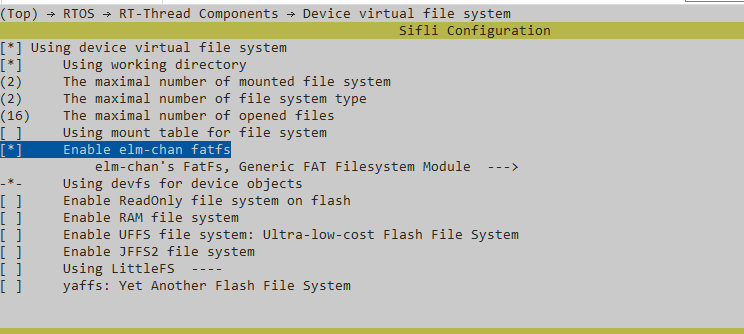
Note: the root partition is mounted in
mnt_init.Enable AUDIO CODEC and AUDIO PROC:
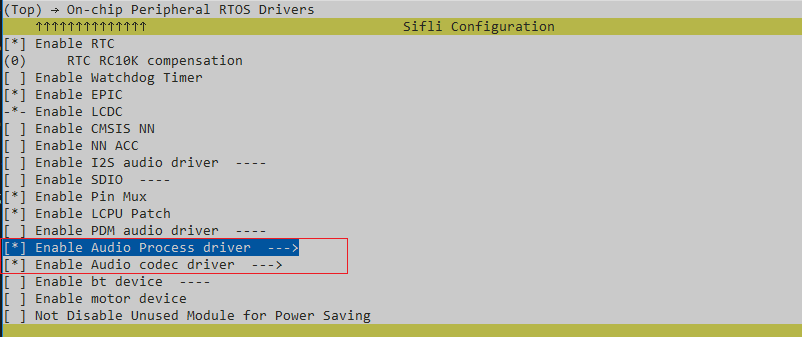
Enable AUDIO (
AUDIO):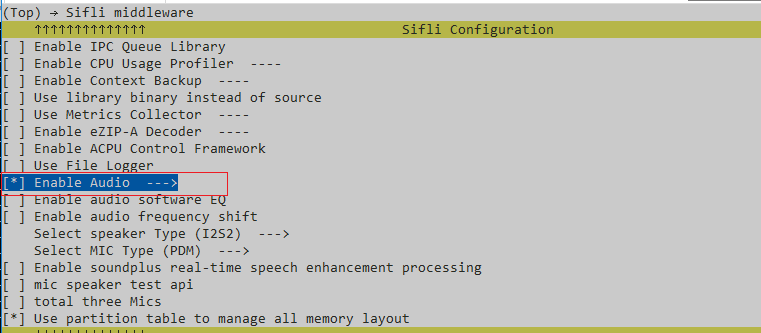
Enable the Audio Manager (
AUDIO_USING_MANAGER):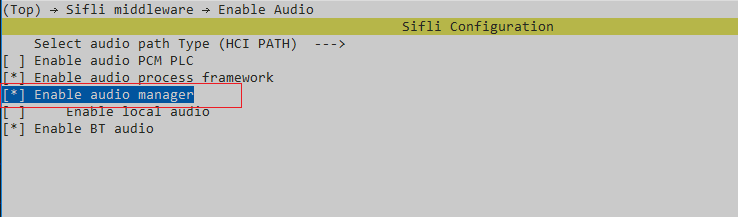
Notes
If opus_test() calls opus_encoder_ctl(encoder, OPUS_SET_FORCE_MODE(MODE_SILK_ONLY));, set OPUS_STACK_SIZE to 20k.
If it does not call that function, set OPUS_STACK_SIZE to 200k.
Recording Implementation
Recording length is controlled by
RECORD_SECONDS(10 s by default) and stops after a fixed number of sample frames: 1000 frames x 320 bytes/frame (10 ms) = 320,000 bytes = 10.000 s.The recording callback copies the data into the PSRAM buffer (
rec_pcm_buf) withmemcpy; no flash access is performed during recording, avoiding audio pipe overflow (dropped frames) and lost SysTick time caused by flash writes.After recording, the whole buffer is written to
/mic16k.pcmin one go. Flash erase/program is slow (a few seconds for 320 KB), so the gap betweenrecord stopandrecord endin the log is expected and does not affect audio quality. The actual recording time is the interval betweenrecord startandrecord stop: xx bytes (xx ms).
Build and Flash
From the example project directory, build with scons:
scons --board=eh-lb525 -j32
Then go to the example project/build_xx directory and run uart_download.bat. Choose the serial port when prompted to flash:
./uart_download.bat

Uart Download
please input the serial port num:5
For detailed build and flash steps, see quick_start.
Expected Behavior
Automatic: On startup the program records 10 seconds from the microphone, then plays back the raw PCM once (playing start ~ playing end) and then plays the Opus encode/decode result (opus runing ... ~ ---opus test exit---). Two playback passes are expected; the second one is the Opus codec path.
Expected log:
record start
record stop: 320000 bytes (10000 ms)
record end        <- several seconds later: flash write time
playing start
playing end       <- first pass: raw PCM playback
opus runing ...
---opus test exit---   <- second pass: encode/decode playback
Manual commands:
opus— record 10 seconds to /mic16k.pcm, play the raw recording, then encode/decode and play againopus /mic16k.pcm— read PCM from the specified file, then encode/decode and playopus xxxxx— if the file does not exist, record and loopback in real time for 10 seconds (record and play simultaneously, Keep the speaker and mic separated, otherwise there will be feedback. You can put the speaker close to your ears to cover it.)
Troubleshooting
References
Revision History
Version |
Date |
Notes |
|---|---|---|
0.0.1 |
12/2025 |
Initial release |
0.0.2 |
10/2026 |
Recording switched to PSRAM buffer with frame-count timing; fixed recording duration drift and frame drops |