
Connection Scenario
Open serial debugging tool, connect to HCPU console serial port, connect measurement device to the module under test
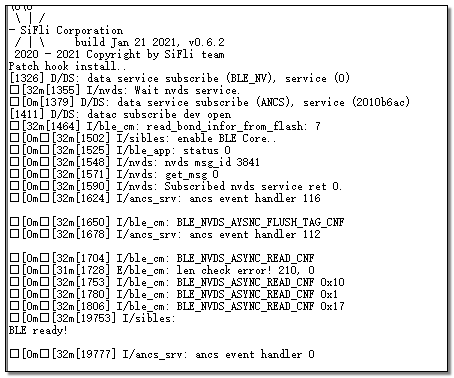
Connect wake-up PIN to low level, press Reset key on the baseboard to reset. After successful startup, the log shown below appears. Similar to measuring ADV current in the ADV chapter, BT Scan also needs to be disabled
Open the LightBlue software on your phone as shown below, find the device named SIFLI_APP in the Scan list, click CONNECT to connect to the device
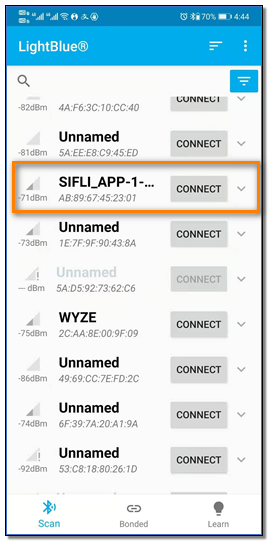
After successful connection, BLE enters connection state, with default connection period of 15ms
Connect wake-up PIN to high level, system enters low power mode, measure current at 15ms interval
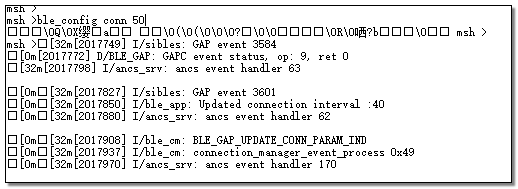
Connect wake-up PIN to low level, system exits low power mode, send command ble_config conn 50 in console to change connection period to 50ms. Confirm that console shows the print as shown below, where “Updated connection interval: 40” indicates connection interval in 1.25ms units, 40×1.25=50ms. If no print appears, it means parameter update failed and the command needs to be sent again. Also observe current waveform to confirm whether interval update is successful
Connect wake-up PIN to high level, system enters low power mode again, measure current at 50ms period. Similar to ADV current, measure 10-second average current C1, record current between two peaks as sleep current C2, and the incremental current in connection state is C=C1-C2
Repeat steps 6 and 7 to measure current when connection period is 200ms, 500ms and 1000ms.