
multroller控件
本文说明 multroller控件 控件的功能、关键接口和使用示例。
1. 参考代码
文件 |
作用 |
|---|---|
|
实现 MultRoller 控件的滚动选择 |
2. 使用场景
multroller滚筒控件主要用于需要用户从一组预设选项中选择特定内容的场景,适用于嵌入式GUI等交互界面,例如参数配置选择、模式切换、列表项选择等场景。该控件支持自定义可见选项数量、选项内容、选中项及焦点样式,能够满足多样化的列表选择交互需求。
3. 接口介绍
接口函数 |
功能说明 |
参数说明 |
|---|---|---|
lv_multroller_create |
创建一个滚轮对象 |
parent:指向父对象的指针,新创建的滚轮将作为该父对象的子对象 |
lv_multroller_set_show_cnt |
设置滚轮显示的子元素数量,子元素尺寸基于父控件尺寸均分,默认显示数量为3 |
multroller:指向滚轮对象的指针;cnt:期望显示的可见子元素数量(uint8_t类型) |
lv_multroller_set_options |
为滚轮设置选项列表,选项以’\n’分隔 |
multroller:指向滚轮对象的指针;options:以’\n’分隔的选项字符串(如"One\nTwo\nThree") |
lv_multroller_set_selected |
设置滚轮选中的选项,支持动画过渡 |
multroller:指向滚轮对象的指针;sel_opt:选中选项的索引(0 ~ 选项数-1);anim_time:动画时长(0表示立即设置,非0表示动画耗时) |
lv_multroller_set_focus_param |
设置滚轮聚焦区域的文本颜色及聚焦区域的宽高 |
multroller:指向滚轮对象的指针;color:聚焦区域内文本的颜色(lv_color_t类型);w:聚焦区域宽度(uint16_t类型);h:聚焦区域高度(uint16_t类型) |
lv_multroller_get_selected |
获取滚轮当前选中选项的索引 |
multroller:指向滚轮对象的指针;返回值:选中选项的索引(0 ~ 选项数-1,uint16_t类型) |
4. 使用案例
4.1 基础使用案例
/* When using the solution application architecture, the functions that must be defined */
static void on_start(void)
{
    lv_obj_t* parent = lv_scr_act();
    lv_obj_set_style_bg_opa(parent, LV_OPA_100, LV_PART_MAIN);
    lv_obj_set_style_bg_color(parent, LV_COLOR_RED, LV_PART_MAIN);

    lv_obj_t* roller = lv_multroller_create(parent);
    lv_obj_set_size(roller, 86, FONT_BIGL * 3);
    lv_obj_align(roller, LV_ALIGN_CENTER, -43, 0);
    lv_ext_set_local_font(roller, FONT_BIGL, LV_COLOR_GRAY);
    lv_multlist_set_dir(roller, LV_MULTLIST_DIR_VER);
    lv_multroller_set_options(roller,"1\n2\n3\n4\n5\n6\n7\n8\n9\n10\n");
    lv_multroller_set_focus_param(roller, LV_COLOR_RED, FONT_BIGL * 2, FONT_BIGL);

    roller = lv_multroller_create(parent);
    lv_obj_set_size(roller, 86, FONT_BIGL * 3);
    lv_obj_align(roller, LV_ALIGN_CENTER, 43, 0);
    lv_ext_set_local_font(roller, FONT_BIGL, LV_COLOR_GRAY);
    lv_multlist_set_dir(roller, LV_MULTLIST_DIR_VER);
    lv_multroller_set_options(roller, "11\n12\n13\n14\n15\n16\n17\n18\n19\n20\n");
    lv_multroller_set_focus_param(roller, LV_COLOR_BLUE, FONT_BIGL * 2, FONT_BIGL);

    lv_obj_t* lab = lv_label_create(parent);
    lv_ext_set_local_font(roller, FONT_HUGE, LV_COLOR_BLACK);
    lv_label_set_text(lab,":");
    lv_obj_align(lab, LV_ALIGN_CENTER, 0, 0);

}

/* When using the solution application architecture, the functions that must be defined */
static void on_resume(void)
{
    lv_gesture_disable();


}

/* When using the solution application architecture, the functions that must be defined */
static void on_pause(void)
{
    lv_gesture_enable();

}

/* When using the solution application architecture, the functions that must be defined */
static void on_stop(void)
{

}
4.2 案例效果展示
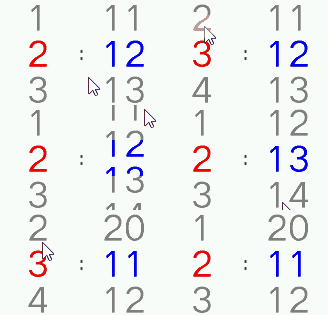
5. 注意事项
选项字符串格式:
lv_multroller_set_options的options参数必须以\n分隔选项,空字符串或格式错误可能导致滚轮显示异常。选中项索引范围:调用
lv_multroller_set_selected时,sel_opt参数需在0 ~ 选项总数-1范围内,超出范围可能导致未定义行为。焦点参数设置:
lv_multroller_set_focus_param的宽高参数需与控件整体尺寸匹配,只有在该区域时,才会将文本的颜色变为指定的颜色。内存管理:
options参数传入的字符串需保证生命周期,若字符串被提前释放,滚轮可能读取到无效内存。multroller控件继承于multlist控件,所以multlist的所有接口均适用于multroller控件。
示例中的
lv_gesture_disable/lv_gesture_enable用于页面级右滑返回手势管理,不属于solution/framework/gui_widget/include/lvsf_multroller.h定义的multroller接口。