
ADC Usage and Configuration Guide
1. Overview
ADC (Analog-to-Digital Converter) is used to convert analog signals (such as sensor outputs, battery voltage, etc.) into digital signals.
Number of Channels: 8 channels in total (Channel 0 ~ 7).
Special Channel: In the
SF32LB52xseries, Channel 7 is fixed for battery voltage detection (VBAT input after resistor divider).
Data Processing: The ADC output value must be combined with the hardware voltage divider network and software calibration values to calculate the actual voltage.
2. Chip Model and Parameter Comparison
ADC parameters vary significantly between different chip models. Please refer to the following configuration based on your actual hardware selection:
Feature |
SF32LB55x |
SF32LB56x / 58x / 52x / 57x |
|---|---|---|
Sampling Bit Width |
10 bit |
12 bit |
Sampling Accuracy |
3~4 mV |
1~2 mV |
Maximum Sampling Voltage |
1.1 V |
3.3 V |
Recommended External Divider Resistors |
1000k / 220k |
470k / 1000k |
RC Stabilization Time |
157 ms |
200 ms |
💡 Tip: Be sure to select appropriate external voltage divider resistors based on the above parameters to ensure the input voltage does not exceed the ADC’s maximum sampling voltage and prevent chip damage.
3. ADC Calibration Mechanism
Due to manufacturing process variations, there is a deviation between the actual ADC voltage and the ideal voltage. The system compensates for this using factory calibration values.
Calibration Principle: Software reads the chip’s factory calibration values to correct measurement results.
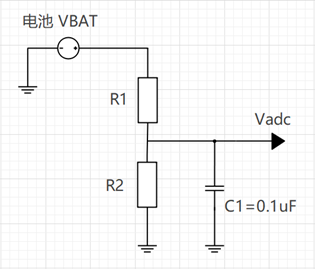
Accuracy Impact: The accuracy of external voltage divider resistors directly affects the final measurement accuracy.
Production Line Recommendation: It is recommended to perform separate calibration of the voltage divider network on the customer’s production line to eliminate resistor errors.
4. Power Supply and Reference Voltage (AVDD & VREF)
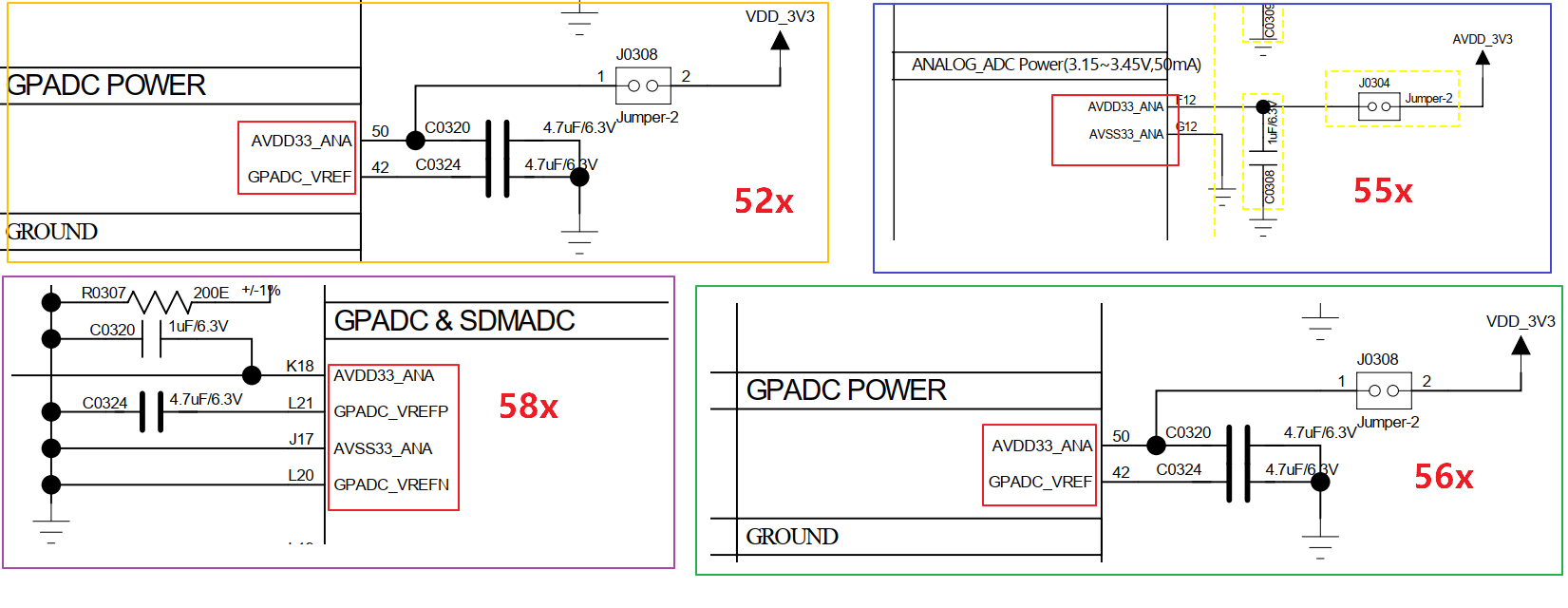
The ADC has only one analog power supply path. Configuration must strictly follow the specifications below:
AVDD33_ANA: 3.3V analog power supply, must be stably connected.
GPADC_VREF: Internal reference voltage pin, not an independent power domain.
Different platforms handle GPADC_VREF differently:
Some platforms: Connect GPADC_VREF to ground through an external capacitor.
Some platforms: No external pin available; provided only by internal reference voltage.
⚠️ Important Warning: The ADC power supply must be connected to AVDD33_ANA. Never apply power directly to the GPADC_VREF pin.
5. Pin (PAD) Configuration
ADC pins are typically configured by setting the PIN to analog function.
5.1 General Configuration Example
// General analog pin settings
HAL_PIN_Set_Analog(PAD_PB08, 0);
HAL_PIN_Set_Analog(PAD_PB13, 0);
5.2 SF32LB55x Specific Configuration
On SF32LB55x, PINs can be directly mapped to specific GPADC channels:
HAL_PIN_Set(PAD_PB08, GPADC_CH0, PIN_NOPULL, 0);
HAL_PIN_Set(PAD_PB13, GPADC_CH3, PIN_NOPULL, 0);
5.3 ADC PAD Channel Distribution Table
Pin mapping relationships for different chip models are as follows:
Channel |
GPADC_CH0 |
GPADC_CH1 |
GPADC_CH2 |
GPADC_CH3 |
GPADC_CH4 |
GPADC_CH5 |
GPADC_CH6 |
GPADC_CH7 |
GPADC_CH8 |
GPADC_CH9 |
GPADC_CH10 |
GPADC_CH11 |
|---|---|---|---|---|---|---|---|---|---|---|---|---|
SF32LB55x |
PB08 |
PB10 |
PB12 |
PB13 |
PB16 |
PB17 |
PB18 |
PB19 |
- |
- |
- |
- |
SF32LB52x |
PA28 |
PA29 |
PA30 |
PA31 |
PA32 |
PA33 |
PA34 |
BAT |
- |
- |
- |
- |
SF32LB56x |
PB22 |
PB23 |
PB24 |
PB25 |
PB26 |
PB27 |
PB28 |
PB32 |
- |
- |
- |
- |
SF32LB57x |
PA28 |
PA29 |
PA30 |
PA31 |
PA32 |
PA33 |
PA34 |
PA35 |
PA36 |
PA37 |
PA38 |
BAT |
SF32LB58x |
PB32 |
PB33 |
PB34 |
PB35 |
PB36 |
PB37 |
PB38 |
PB39 |
- |
- |
- |
- |
6. Software Interface Usage
By default, the system registers the ADC as a battery voltage device with the device name bat1.
6.1 Device Interface Calls (RT-Thread)
uint32_t chnl = 1; // Specify channel
uint32_t value;
rt_device_t dev = rt_device_find("bat1");

if (dev) {
    rt_device_open(dev, RT_DEVICE_FLAG_RDONLY);
    rt_device_control(dev, RT_ADC_CMD_ENABLE, (void *)chnl);
    rt_device_read(dev, chnl, &value, 1);
}
6.2 HAL Interface Calls
If using the HAL library, you can directly obtain the raw value through the following interface:
HAL_ADC_GetValue(channel);
7. Voltage Calculation and Calibration
The ADC value has a linear relationship with the input voltage. The actual voltage calculation formula is as follows:
Where:
Offset: The offset when the register value corresponds to 0V.
Ratio: The voltage increment (slope) corresponding to each register value increase.
7.1 Calibration Method
Determine parameters using two known voltage points (avoid using 0V or maximum voltage as calibration points):
Input two accurate and stable voltage values (55x: 0.3V and 0.8V, 56x/52x/58x/57x: 1.0V and 2.5V).
Read the corresponding ADC register values.
Calculate the slope and offset.
Save the parameters for subsequent use.
7.2 Reference Code Implementation
// Global variable definitions
static uint32_t adc_vol_offset = 200;
static uint32_t adc_vol_ratio = 3930;
#define ADC_RATIO_ACCURATE 1000

// Convert ADC value to millivolts (mV)
int sifli_adc_get_mv(uint32_t value) {
    return (value - adc_vol_offset) * adc_vol_ratio / ADC_RATIO_ACCURATE;
}

// Calibration function
int sifli_adc_calibration(uint32_t value1, uint32_t value2,
                          uint32_t vol1, uint32_t vol2,
                          uint32_t *offset, uint32_t *ratio) {
    uint32_t gap1, gap2;

    if (offset == NULL || ratio == NULL) return 0;

    gap1 = (value1 > value2) ? (value1 - value2) : (value2 - value1);
    gap2 = (vol1 > vol2) ? (vol1 - vol2) : (vol2 - vol1);

    if (gap1 == 0) return 0;

    *ratio = gap2 * ADC_RATIO_ACCURATE / gap1;
    adc_vol_ratio = *ratio;

    *offset = value1 - (vol1 * ADC_RATIO_ACCURATE / adc_vol_ratio);
    adc_vol_offset = *offset;

    return adc_vol_offset;
}