
eMMC/SD Card Example
Source: example/rt_device/emmc
Overview
This example demonstrates how to create partitions on eMMC or SD card, mount the elm (FAT) filesystem on the partitions, and perform file operations.
Supported Platforms
sf32lb56-lcd_a128r12n1
sf32lb56-lcd_n16r12n1
sf32lb58-lcd_n16r64n4
sf32lb58-lcd_a128r32n1_dsi
Usage Guide
The eMMC application creates partitions on the board’s TF card, mounts the filesystem (FAT format), and provides common file commands via the UART console.
df               - Show filesystem disk usage
mountfs          - Mount device to filesystem
mkfs             - Format disk with filesystem
mkdir            - Create a directory
pwd              - Print current working directory
cd               - Change working directory
rm               - Remove (unlink) files/directories
cat              - Concatenate files (create and write content)
mv               - Rename SOURCE to DEST
cp               - Copy SOURCE to DEST
ls               - List files and directories
Menuconfig Configuration
sdk.py menuconfig --board=56devkit_lcd (replace with your board name)
Enable SDIO

For single-wire speed testing, enable
SDMMC1_BUS_WIDTH_1_ONLY/SDMMC2_BUS_WIDTH_1_ONLY(disabled by default, 4-wire mode operation).
Enable and configure the SD device

Build and Flash
Follow these steps to build and flash the firmware:
scons --board=56_devkit_lcd -j8
build_56_board_lcd_hcpu\download.bat  (or uart_download.bat for serial download)
Two flashing methods are supported: J-Link and UART.
Expected Results
Mount success log (look for the highlighted areas in the image below)
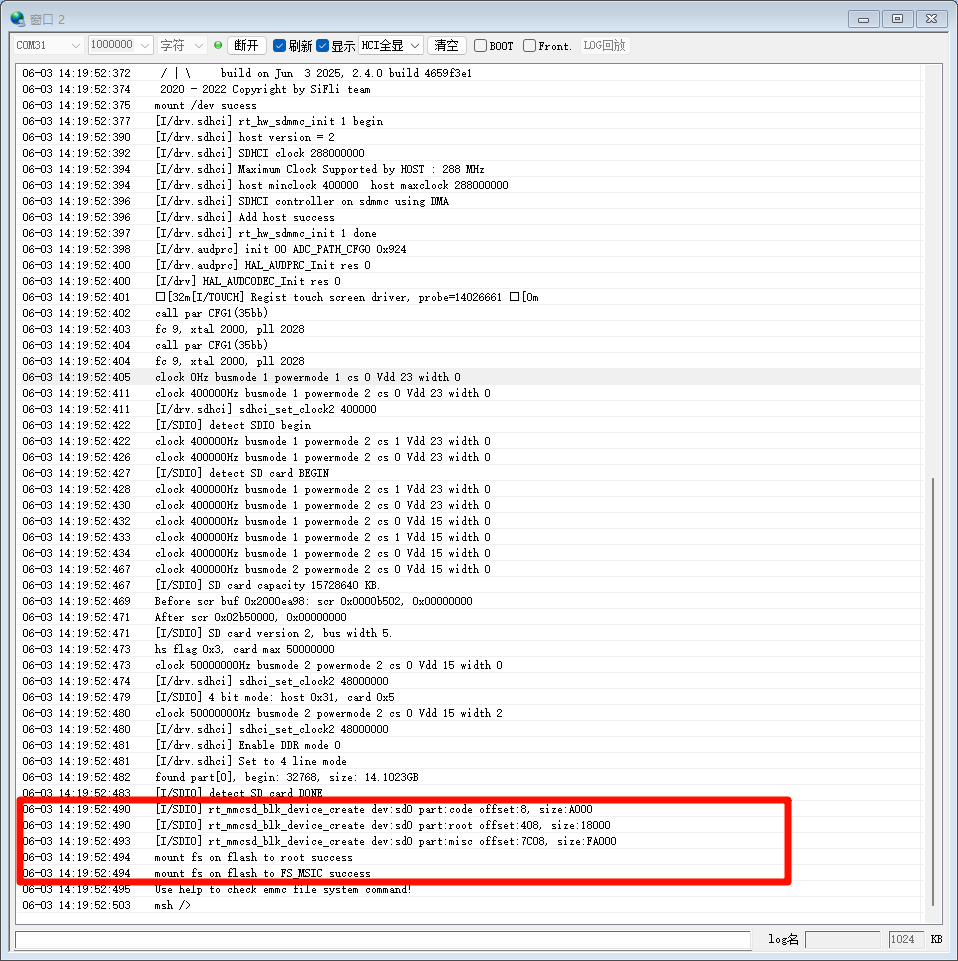
File operations: use
lsto list existing files/directories,mkdir <dir>to create a directory,cdinto it,echoto create a text file and write content,catto view file content, andpwdto check the current working directory.
Read/Write Speed Test
This example provides 4 commands for testing eMMC/SD card read/write speed. Output unit is Mb/s.
Basic Commands (fixed 512-byte blocks)
Command |
Usage Example |
Description |
|---|---|---|
|
|
Write 4096 blocks of 512B (2MB) to a file, testing filesystem write speed |
|
|
Read 4096 blocks of 512B (2MB) from a file, testing filesystem read speed |
Parameter num is the number of 512B blocks. Total data size = num x 512B. For example, fs_write /1.txt 2048 writes 1MB, fs_write /1.txt 4096 writes 2MB.
Extended Commands (recommended)
Command |
Usage Example |
Description |
|---|---|---|
|
|
Write specified amount of data, testing filesystem write speed |
|
|
Read specified amount of data, testing filesystem read speed |
Extended commands internally convert to 512B block counts and delegate to basic commands, providing more user-friendly unit parameters.
Parameter Description
total_size: supportsk/K(KB) andm/M(MB) units, e.g.512k1m2m4m8m
Typical Speed Test Workflow
fs_write_ex /1.txt 2m      <- Write 2MB test data first
fs_read_ex  /1.txt 2m      <- Then read 2MB to measure read speed
Example Output
Read/Write speed test results
07-10 15:26:59:328 TX:fs_write_ex /6.txt 2M
07-10 15:27:02:279    cmd_fs_write_t path=/6.txt num=4096 blocks testtime=2718475.250000uS,speed_test=6.171554Mb/s
07-10 15:27:02:290    msh />msh />
07-10 15:28:14:246 TX:fs_read_ex /6.txt 2M
07-10 15:28:14:748    cmd_fs_read_t  path=/6.txt num=4096 blocks testtime=496185.312500uS,speed_test=33.812401Mb/s
07-10 15:28:14:757    msh />msh />
Unexpected Results (logs)
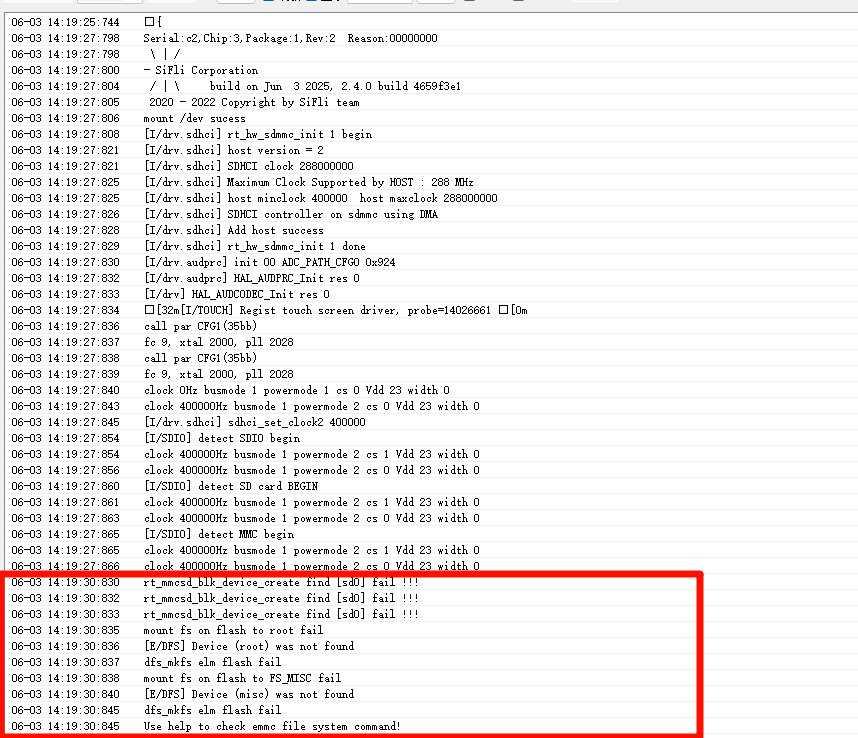
Failure Causes and Solutions
If the log shows the following, first check whether a TF card is inserted, then verify that SD is enabled in menuconfig (refer to the menuconfig configuration section above):
rt_mmcsd_blk_device_create find [sd0] fail !!!
If the log shows the following, check whether a TF card is inserted:
[E/DFS] Device (root) was not found
[E/DFS] Device (misc) was not found
If the expected output does not appear, troubleshoot from the following aspects:
Check whether hardware connections are correct
Check whether the USB connector is loose
Check whether the USB cable supports data transfer
Check whether the TF card is functional