
Battery Calculator
The battery calculator module is used to calculate the current battery percentage based on battery voltage values. It considers both charging and discharging states, uses different battery curve tables, and implements a multi-level filtering algorithm to improve the accuracy and stability of battery level calculation.
Features
Dual Curve Support: Supports separate battery voltage curves for charging and discharging states
Multi-level Filtering Algorithm:
Primary Filter: Threshold-based jump filtering
Secondary Filter: Weighted average smoothing (optional)
Charge/Discharge State Detection: Automatically recognizes current charging state and switches corresponding curves
Linear Interpolation Calculation: Performs precise percentage calculation within curve tables
Core Structure
battery_calculator_config_t
Battery calculator configuration structure:
typedef struct {
    const battery_lookup_point_t *charging_table;      // Charging curve table
    uint32_t charging_table_size;                      // Charging curve table size
    const battery_lookup_point_t *discharging_table;   // Discharging curve table
    uint32_t discharging_table_size;                   // Discharging curve table size
    uint32_t charge_filter_threshold;                  // Charging filter threshold (mV)
    uint32_t discharge_filter_threshold;               // Discharging filter threshold (mV)
    uint8_t filter_count;                              // Filter count threshold
    bool secondary_filter_enabled;                     // Whether to enable secondary filter
    uint8_t secondary_filter_weight_pre;               // Secondary filter previous voltage weight (0-100)
    uint8_t secondary_filter_weight_cur;               // Secondary filter current voltage weight (0-100)
} battery_calculator_config_t;
API Functions
1. battery_calculator_init
void battery_calculator_init(battery_calculator_t *calc,
                            const battery_calculator_config_t *config);
Function: Initialize battery calculator
Parameters:
calc: Battery calculator instance pointerconfig: Configuration parameter pointer
Example:
battery_calculator_t battery_calc;
//To facilitate the adaptation and use of different boards, the battery curve table and the required variable implementations are placed in the `battery_table.c` file under the board directory.
battery_calculator_config_t calc_config = {
    .charging_table = charging_curve_table,
    .charging_table_size = charging_curve_table_size,
    .discharging_table = discharge_curve_table,
    .discharging_table_size = discharge_curve_table_size,
    .charge_filter_threshold = 50,      // Charging filter threshold
    .discharge_filter_threshold = 30,   // Discharging filter threshold
    .filter_count = 3,                   // Filter count threshold
    .secondary_filter_enabled = true,    // Enable secondary filter
    .secondary_filter_weight_pre = 90,   // Secondary filter previous voltage weight
    .secondary_filter_weight_cur = 10    // Secondary filter current voltage weight
};

battery_calculator_init(&battery_calc, &calc_config);
2. battery_calculator_get_percent
uint8_t battery_calculator_get_percent(battery_calculator_t *calc,
                                      uint32_t voltage_mv);
Function: Calculate battery percentage
Parameters:
calc: Battery calculator instance pointervoltage_mv: Current battery voltage value (millivolts)
Return Value: Battery percentage (0-100)
Example:
uint32_t voltage = 38000;  // 3.8V
uint8_t percentage = battery_calculator_get_percent(&battery_calc, voltage);
rt_kprintf("Battery: %d%%\n", percentage);
Usage Example
First, enable the required macro switches in menuconfig
Enable the ADC to read the battery voltage.
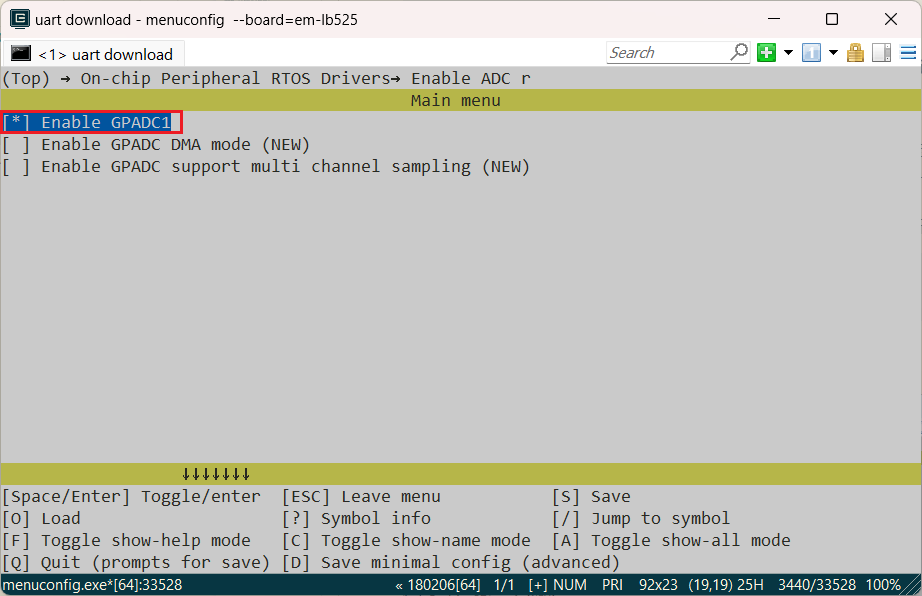
Enable battery calculator function

Enable charge

Select the charging chip for your board. If not available, use simple charge

Configure plug/unplug detection pin corresponding to your board’s detection pin

Select the polarity of the plug/unplug detection pin for the current board (choose according to actual situation).
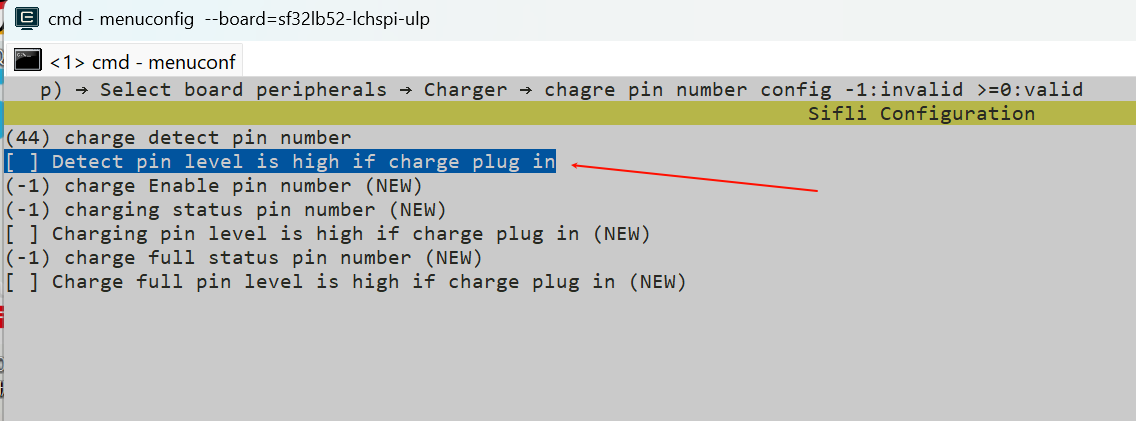 Selecting this option means enabling the
 BSP_CHARGER_INT_PIN_ACTIVE_HIGHmacro. This macro defines the polarity of the charger detection pin. WhenBSP_CHARGER_INT_PIN_ACTIVE_HIGHis defined, it indicates that the charger insertion state is represented by a high level. When this macro is not defined, the default is to use a low level to represent the charger insertion state.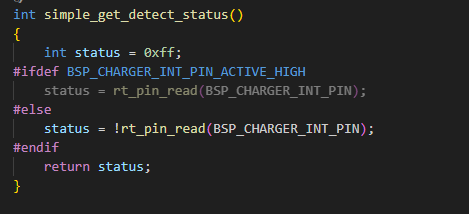
Complete Application Layer Example Code
#include "battery_calculator.h"

void battery_monitor_task(void *parameter)
{
    // 1. Initialize battery calculator
    battery_calculator_t battery_calc;
    battery_calculator_config_t calc_config = {
        .charging_table = charging_curve_table,
        .charging_table_size = charging_curve_table_size,
        .discharging_table = discharge_curve_table,
        .discharging_table_size = sizeof(discharge_curve_table)/sizeof(battery_lookup_point_t),
        .charge_filter_threshold = 50,      // 50mV threshold during charging
        .discharge_filter_threshold = 30,   // 30mV threshold during discharging
        .filter_count = 3,                  // Requires 3 confirmations
        .secondary_filter_enabled = true,   // Enable secondary filter
        .secondary_filter_weight_pre = 90,  // Previous voltage weight 90%
        .secondary_filter_weight_cur = 10   // Current voltage weight 10%
    };

    battery_calculator_init(&battery_calc, &calc_config);

    while (1)
    {
        // 2. Read ADC voltage value
        rt_device_t battery_device = rt_device_find("bat1");
        rt_adc_cmd_read_arg_t read_arg;
        read_arg.channel = 7;

        rt_adc_enable((rt_adc_device_t)battery_device, read_arg.channel);
        rt_thread_mdelay(300);
        rt_uint32_t voltage = rt_adc_read((rt_adc_device_t)battery_device, read_arg.channel);
        rt_adc_disable((rt_adc_device_t)battery_device, read_arg.channel);

        // 3. Calculate battery percentage
        uint8_t percentage = battery_calculator_get_percent(&battery_calc, voltage);

        rt_thread_mdelay(1000);
    }
}
Configuration Parameters
Filter Threshold Settings
Parameter |
Recommended Value |
Description |
|---|---|---|
|
50mV |
Voltage jump threshold in charging state |
|
30mV |
Voltage jump threshold in discharging state |
|
3 |
Number of consecutive times threshold must be exceeded to update |
Secondary Filter Parameters
Parameter |
Recommended Value |
Description |
|---|---|---|
|
true |
Whether to enable secondary filter |
|
90 |
Historical voltage weight (0-100) |
|
10 |
Current voltage weight (0-100) |
Note: weight_pre + weight_cur = 100
Battery Curve Table Configuration
Important Note: The default battery curve table provided in the board directory is only a reference example and may not be suitable for the actual battery currently in use. To ensure the accuracy of battery level calculation, it is strongly recommended to obtain matching battery voltage-capacity curve data from the battery manufacturerand configure the corresponding lookup table according to the actual curve.
Battery curve table interface description:
Charging curve table
Variable name:
charging_curve_tableType:
const battery_lookup_point_t[]Description: Defines the voltage-percentage relationship during battery charging state, with voltage values arranged in descending order
Discharging curve table
Variable name:
discharge_curve_tableType:
const battery_lookup_point_t[]Description: Defines the voltage-percentage relationship during battery discharging state, with voltage values arranged in descending order
Battery curve tables are defined in battery_table.c in the following format:
const battery_lookup_point_t chargeing_curve_table[] = {
    { 100,  41808},  // 4.18V -> 100%
    { 99,   41401},
    { 98,   41109},
    { 97,   40921},
    { 96,   40762},
    { 95,   40647},
    { 94,   40546},
    // ... more points
    {0,    35006}     // 3.5V -> 0%
};
Configuration Points:
Voltage values arranged from high to low
Percentages correspond from 100 to 0
Charging and discharging curves are defined separately
Adjust curve points according to actual battery characteristics
Important Notes
Initialization Order: Must call
battery_calculator_init()before usingbattery_calculator_get_percent()Voltage Units: All voltage values use millivolts (mV) as the unit
Curve Table Requirements: Curve table must be sorted by voltage from high to low
Charging State Detection: Module automatically detects charging state through
CHARGE_DETECT_PINFilter Parameter Adjustment: Adjust filter parameters according to actual battery characteristics and application scenarios
FAQ
Q: Battery level jumps too quickly?
A: Increase filter threshold or increase filter_count value, or enable secondary filter and increase historical weight.
Q: Battery level display is inaccurate?
A: Check if the battery curve table matches actual battery characteristics. Recalibrate curve points if necessary.
Q: How to disable secondary filter?
A: Set secondary_filter_enabled = false.
Q: Battery level value stuck at a fixed number?
A: The current battery algorithm has the following logic processing: in charging state, battery level is not allowed to decrease, and in discharging state, battery level is not allowed to increase. When such abnormal situations occur, the battery level will remain at the current value for stabilization. You can check the log to confirm whether “Current status” matches the real state. If they don’t match, you need to adjust the BSP_CHARGER_INT_PIN_ACTIVE_HIGH macro.