
Video Document
video use ffmpeg,see exernal/ffmpeg/Kconfig,use software decode only, no harware accelerator,video should convert codec to h264 or mjpeg, and should use baseline profile。 and support ezip encoder for this chip,Use hardware decoding for ezip. Ezip does not support inter-frame compression, meaning each image is compressed with ezip individually. Combined with audio, it still uses MP4 packaging, and the external interface remains unchanged.
memory footprint
code size: 310K bytes global var size: 1K bytes malloc: 3.3M byte 240 * 320 (3 frame cache).
performance
The maximum playback size around 240 * 320 can reach 30fps. If it’s larger, the frame rate needs to be reduced. It also depends on the complexity of the image details; if the details are too complex, the compression rate is low and decoding slowly.
The previous software required the width of the converted video to be a multiple of 16. (Otherwise, there will be display artifacts, because after decoding with ffmpeg, each line is padded to align to a multiple of 16, which reduces performance as data has to be copied line by line from ffmpeg to display correctly)
suupored codec
h264
h263
mp3
aac
mjpeg
ezip
opus
vorbis
Supported audio and video container formats
ogg
mp4
menuconfig
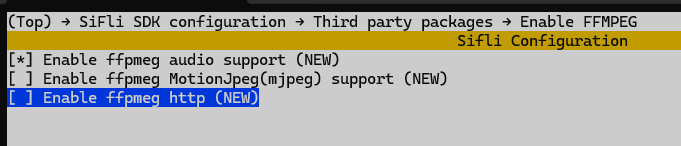
You need to enable PKG_USING_FFMPEG in menuconfig to support ffmpeg. To support audio in mp4 files, you also need to enable PKG_USING_FFMPEG_AUDIO. To support online videos, you need to enable PKG_USING_FFMPEG_HTTP. To support mjpeg, enable PKG_USING_FFMPEG_MJPEG (hardware decoding is only available on the 58x chip platform; software decoding is not recommended).
toolchain
Video files are usually large and the formats can be quite complex, so they need to be converted before they can be played.
ffmpeg toolchain
https://ffmpeg.org
Video conversion, trimming, and scaling tool ffmpeg.exe
probe tool ffprobe.exe
player tools ffplay.exe
This is generally used for local debugging, an example high means High-quality encoding format, this software cannot support decoding it and needs to be converted to baseline.
example:
high means High-quality encoding format, this software cannot support decoding it and needs to be converted to baseline.
example:
#
ffmpeg -i input.mp4 -profile:v baseline -level 1.0 -r 30 -acodec mp3 -ar 44100 -ac 2 output.mp4
# -profile:v baseline -level 1.0 to baseline
# -r 30 30fps, Can be appropriately reduced based on the image size to lower CPU usage.
# -acodec mp3 mp3,or use "-acodec aac" for aac
# -ar 44100 audio samplerate
# -ac 2 stereo,-ac 1 mono
# The output file extension in the command must be mp4, otherwise it may not convert properly.
# to mjpeg
ffmpeg -i input.mp4 -c:v mjpeg -c:a copy -vf "colorspace=bt709:iall=bt470bg:range=pc" video_example.mp4
use ffprobe.exe to probe,use ffplay.exe to play
Sifli toolchain
An image conversion tool built on the official FFmpeg toolchain. Instructions for use are provided in the documentation under the tool. GraphicsTool https://wiki.sifli.com/tools/index.html If you want to convert to the ezip image encoding format, you can only use this tool. EZIP format cannot be played with ffplay.exe; it can only be played on the board.
Viedo convert
Video conversion can use the official ffmpeg tool mentioned above (does not support ezip) or the Sifli toolchain. For using the official tool, you can check the help with ffmpeg -h or ffmpeg -h full, or you can search online for commonly used ffmpeg commands.
The required converted width is a multiple of 16, and the encoding format is baseline.
example
local file player: It turns out that the disk directory contains an empty file, which needs to be replaced with the converted baseline format MP4 file.
https://gitee.com/SiFli/sifli-sdk/tree/main/example/multimedia/lvgl/lvgl_v8_medianetwork URL example: You need to turn on your phone’s BT PAN and share the network and hotspot. https://gitee.com/SiFli/sifli-sdk/tree/main/example/multimedia/lvgl/streaming_media
API
API refrence media_dec.h
/**
 * @brief open a media URL to play
 *
 * @param return_hanlde return the handle
 * @param cfg configure for media info @see ffmpeg_config_t
 * @param user_data The user data that will be passed to notify() in ffmpeg_config_t
 *
 * @return 0 if successful, negative errno code if failure.
 */
 int ffmpeg_open(ffmpeg_handle *return_hanlde, ffmpeg_config_t *cfg, uint32_t user_data);
/**
 * @brief stop ffmpeg playing
 *
 * do not call this in callback functioin notify()
 *
 * @param hanlde the handle got by ffmpeg_open()
 *
 */
void ffmpeg_close(ffmpeg_handle hanlde);
/**
 * @brief pause ffmpeg playing
 *
 * do not call this in callback functioin notify()
 *
 * @param hanlde the handle got by ffmpeg_open()
 *
 */
void ffmpeg_pause(ffmpeg_handle hanlde);
/**
 * @brief resume ffmpeg playing
 *
 * do not call this in callback functioin notify()
 *
 * @param hanlde the handle got by ffmpeg_open()
 *
 */
void ffmpeg_resume(ffmpeg_handle hanlde);
/**
 * @brief seek ffmpeg playing
 *
 * do not call this in callback functioin notify()
 *
 * @param hanlde the handle got by ffmpeg_open()
 * @param second seek to seconds from beginning
 *
 */
void ffmpeg_seek(ffmpeg_handle hanlde, uint32_t second);
/**
 * @brief mute/unmute audio
 *
 * @param hanlde the handle got by ffmpeg_open()
 * @param is_mute mute or unmute audio. 1--mute, 0-- unmute
 *
 */
void ffmpeg_audio_mute(ffmpeg_handle hanlde, bool is_mute);
/**
 * @brief release memory alloced by ffmpeg_eizp_release() or ffmpeg_get_first_ezip_in_nand()
 *
 * @param ezip alloced memory address by ffmpeg_eizp_release() or ffmpeg_get_first_ezip_in_nand()
 */
void ffmpeg_eizp_release(uint8_t *ezip);
/**
 * @brief get first ezip in local disk media file
 *
 * @param filename the file name in local disk
 * @param[out] w return picture width
 * @param[out] h return picture height
 * @param[out] psize return picture size in bytes
 * @return non-NULL poiner in memory for first picure, should release by ffmpeg_eizp_release(), return NULL if error
 */
uint8_t *ffmpeg_get_first_ezip(const char *filename, uint32_t *w, uint32_t *h, uint32_t *psize);
/**
 * @brief get first ezip nand
 *
 * @param nand_address media address in nand
 * @param nand_size media size in nand
 * @param[out] w return picture width
 * @param[out] h return picture height
 * @param[out] psize return picture size in bytes
 * @return non-NULL poiner in memory for first picure, should release by ffmpeg_eizp_release(), return NULL if error
 */
uint8_t *ffmpeg_get_first_ezip_in_nand(const char *nand_address, uint32_t nand_size,
                                       uint32_t *w, uint32_t *h, uint32_t *psize);
/**
 * @brief get video infomation
 *
 * @param hanlde the handle got by ffmpeg_open()
 * @param[out] video_width return picture width
 * @param[out] video_heightreturn picture height
 * @param[out] info picture format
 * @return 0 if successful, negative errno code if failure.
 */
int ffmpeg_get_video_info(ffmpeg_handle hanlde, uint32_t *video_width, uint32_t *video_height, video_info_t *info);
/**
 * @brief get new frame in ffmepg cache, should call ffmpeg_is_video_available() first, call this if new video frame available
 *
 * @param hanlde the handle got by ffmpeg_open()
 * @param data get the new frame data, diffrent format has diffrent means in *data, @see sifli_gpu_fmt_t
 *             format is return by ffmpeg_get_video_info()
 *             1. if format is e_sifli_fmt_ezip
 *                data[0] -- data addr
 *                data[1] -- data size
 *                data[2] -- IMG_DESC_FMT_EZIP
 *             2. if format e_sifli_fmt_mjpeg
 *                data[0] -- data addr
 *                data[1] -- unused
 *                data[2] -- unused
 *             3. if format e_sifli_fmt_yuv420p, app can use yuv directly for 52x/56x/57x chip
 *                data[0] -- y address
 *                data[1] -- u address
 *                data[2] -- v address
 * @return true if new frame decoded in ffmpeg cache, false no new frame decoded
 */
int ffmpeg_next_video_frame(ffmpeg_handle hanlde, uint8_t *data);
/**
 * @brief check video cache if a new frame is decoded to display
 *
 * @param hanlde the handle got by ffmpeg_open()
 *
 * @return true if new frame decoded in ffmpeg cache, false no new frame decoded
 */
bool ffmpeg_is_video_available(ffmpeg_handle hanlde);
/**
 * @brief check if there is a ffmpeg handle is playing
 *
 * not thread safe, maybe return a handle, the the handle was close by its user
 *
 * @return ffmpeg handle if exist, NULL if not exist
 */
ffmpeg_handle ffmpeg_player_status_get(void);