
BLE Pair Example
Source path: example/ble/pair
Supported Platforms
All platforms
Overview
This example shows how to use GAP peripheral pairing on this platform.
How to Use
This example acts as a BLE Peripheral, starts advertising on boot, and supports pairing. You can use a mobile BLE app to complete pairing and verify GATT read/write.
Procedure
Power on the device. It starts advertising automatically. The name format is
SIFLI_APP-xx-xx-xx-xx-xx-xx.Use a mobile BLE app to scan and connect.
After connection, send
cmd_diss set_sec xx xxto trigger pairing. For example:
cmd_diss set_sec 0 2
Parameter note:
0is the connection indexconn_idx(usually 0 for a single connection).2is the security level (LE_SECURITY_LEVEL_NO_MITM_BOND: bonding without MITM). After sending the command, the phone shows a pairing request.
Tap Pair. The phone asks for a PIN. Enter the PIN shown in the device log to complete pairing.
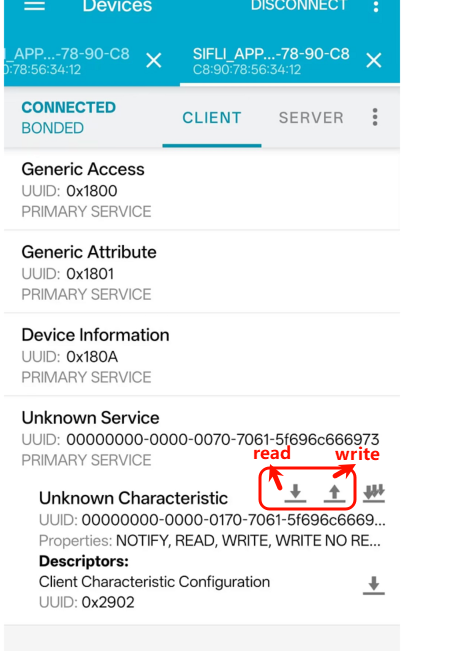
After connecting, use the BLE app to perform GATT read/write tests:
Read: returns 4 bytes (little-endian).
Write: supports 1 to 4 bytes. The UART log prints the new value.

Hardware Requirements
Before running this example, prepare:
A development board supported by this example (Supported Platforms).
A mobile phone.
Build and Flash
Switch to the example project directory and build with scons:
> scons --board=eh-lb525 -j32
Switch to the example project/build_xx directory, run uart_download.bat, and follow the prompt to select the port:
$ ./uart_download.bat

     Uart Download

please input the serial port num:5
For detailed build and download steps, refer to Quick Start.
Expected Results
On power-up, the UART prints
receive BLE power on!and advertising starts.The phone can discover and connect. The log shows
Peer device(xx-xx-xx-xx-xx-xx) connected.When pairing is triggered, the log prints
SHOW PINorSHOW NC, and the connection remains after pairing.During GATT read/write tests, the log prints
Updated app value from:xx to:xx.
Troubleshooting
References
Revision History
Version |
Date |
Notes |
|---|---|---|
0.0.1 |
01/2025 |
Initial version |