
Opus Example
Source: example/multimedia/audio/opus
Supported Platforms
eh-lb525
Overview
This example demonstrates how to use the Opus audio codec library to record, encode, decode, and play audio. The example includes:
Recording PCM audio from a microphone at 16 kHz sample rate
Encoding: compressing PCM frames with the Opus encoder (10 ms frames, ~16 kbps)
Decoding: decompressing Opus-encoded audio with the Opus decoder
Playback: outputting decoded PCM to the speaker
Usage
Hardware Requirements
Before running the example, prepare:
A supported development board (see quick_start)
A speaker
menuconfig Settings
This example reads and writes files, so enable the FAT filesystem:
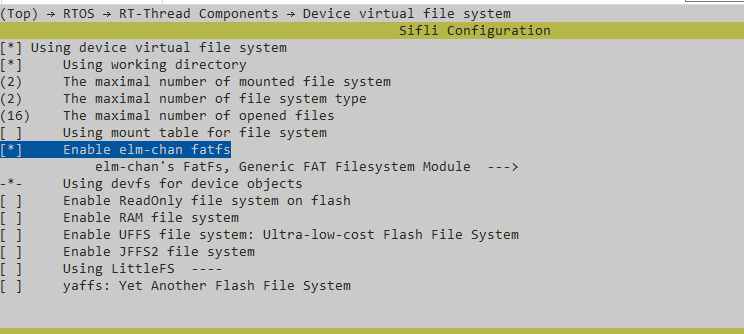
Note: the root partition is mounted in
mnt_init.Enable AUDIO CODEC and AUDIO PROC:
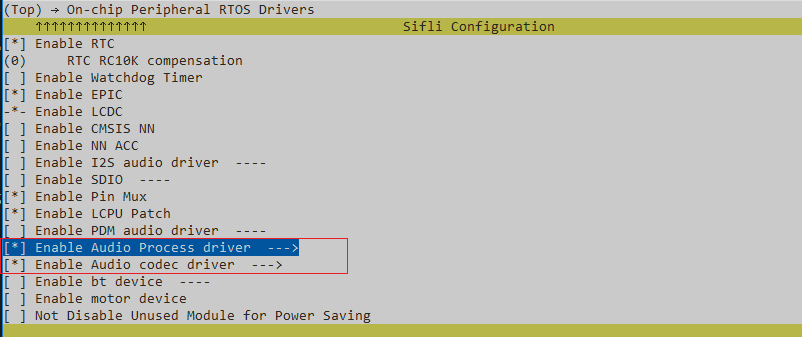
Enable AUDIO (
AUDIO):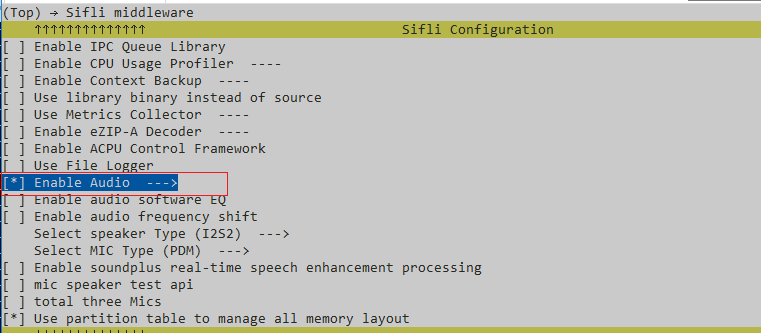
Enable the Audio Manager (
AUDIO_USING_MANAGER):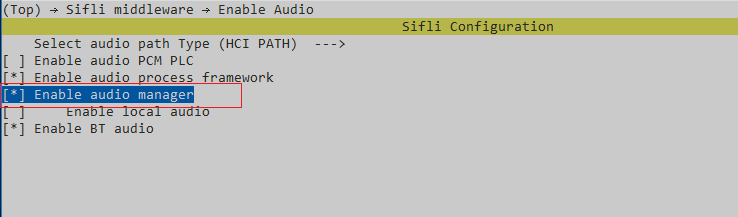
Notes
If opus_test() calls opus_encoder_ctl(encoder, OPUS_SET_FORCE_MODE(MODE_SILK_ONLY));, set OPUS_STACK_SIZE to 20k.
If it does not call that function, set OPUS_STACK_SIZE to 200k.
Build and Flash
From the example project directory, build with scons:
scons --board=eh-lb525 -j32
Then go to the example project/build_xx directory and run uart_download.bat. Choose the serial port when prompted to flash:
./uart_download.bat

Uart Download
please input the serial port num:5
For detailed build and flash steps, see quick_start.
Expected Behavior
Automatic: On startup the program records 10 seconds from the microphone, encodes and decodes the audio, then plays it back.
Manual commands:
opus— record 10 seconds to /mic16k.pcm, then encode/decode and playopus /mic16k.pcm— read PCM from the specified file, then encode/decode and playopus xxxxx— if the file does not exist, record and loopback in real time for 10 seconds (record and play simultaneously, Keep the speaker and mic separated, otherwise there will be feedback. You can put the speaker close to your ears to cover it.)
Troubleshooting
(No specific diagnostics provided.)
References
For RT-Thread device examples, refer to the RT-Thread documentation (for example, see the RTC documentation on the RT-Thread website).
Revision History
Version |
Date |
Notes |
|---|---|---|
0.0.1 |
12/2025 |
Initial release |