
I2C SLAVE Example
Source path: example/hal/i2c/slave
Supported Platforms
The example can run on the following development boards:
sf32lb52-lcd_n16r8
sf32lb58-lcd_n16r64n4
sf32lb56-lcd_n16r12n1
Overview
This example demonstrates how to use the chip’s I2C interface to implement master-slave communication functionality. The code implements I2C Slave Mode (EXAMPLE_I2C_SLAVE), in this mode:
Device address is set to 0x5A
Initialize I2C interface in slave mode
Receive 4-byte data sent by the master
Send preset 4-byte data {0xAA, 0xBB, 0xCC, 0xDD} to the master
Working Principle
In slave mode, the device cyclically performs the following operations:
Wait to receive data sent by the master (blocking wait)
After successfully receiving data, print the received data
Delay 100 milliseconds
Send preset response data to the master
Print transmission status
Example Usage
Using sf32lb52-lcd_n16r8 development board as an example, run this example and check the serial output.
Hardware Requirements
Before running this example, you need to prepare:
One development board supported by this example
Several Dupont wires
Hardware Connection
The I2C connection method for two development boards is as follows:
Development Board |
SDA Pin |
SDA Pin Name |
SCL Pin |
SCL Pin Name |
|---|---|---|---|---|
sf32lb52-lcd_n16r8 |
3 |
PA42 |
5 |
PA41 |
sf32lb56-lcd_n16r12n1 |
3 |
PA12 |
5 |
PA20 |
sf32lb58-lcd_n16r64n4 |
3 (CONN1) |
PB29 |
5 (CONN1) |
PB28 |
Compilation and Programming
Switch to the example project directory and run the scons command to compile:
scons --board=sf32lb52-lcd_n16r8 -j8
Run build_sf32lb52-lcd_n16r8_hcpu\uart_download.bat, and follow the prompts to select the port for downloading:
build_sf32lb52-lcd_n16r8_hcpu\uart_download.bat

Uart Download

please input the serial port num:5
Example Output Results:
Log output:
11-18 20:11:21:771 SFBL
11-18 20:11:23:829 Serial:c2,Chip:4,Package:3,Rev:2 Reason:00000000
11-18 20:11:23:833 \ | /
11-18 20:11:23:834 - SiFli Corporation
11-18 20:11:23:837 / | \ build on Nov 18 2025, 2.4.0 build dd4cae55
11-18 20:11:23:839 2020 - 2022 Copyright by SiFli team
11-18 20:11:23:840 mount /dev sucess
11-18 20:11:23:841 [I/drv.rtc] PSCLR=0x80000100 DivAI=128 DivAF=0 B=256
11-18 20:11:23:845 [I/drv.rtc] RTC use LXT RTC_CR=00000001
11-18 20:11:23:848 [I/drv.rtc] Init RTC, wake = 0
11-18 20:11:23:849 [I/drv.audprc] init 00 ADC_PATH_CFG0 0x606
11-18 20:11:23:849 [I/drv.audprc] HAL_AUDPRC_Init res 0
11-18 20:11:23:852 [I/drv.audcodec] HAL_AUDCODEC_Init res 0
11-18 20:11:23:853 [32m[I/TOUCH] Regist touch screen driver, probe=1203bec5 [0m
11-18 20:11:23:854 call par CFG1(3313)
11-18 20:11:23:855 fc 9, xtal 2000, pll 2047
11-18 20:11:23:855 call par CFG1(3313)
11-18 20:11:23:856 fc 9, xtal 2000, pll 2046
11-18 20:11:23:865 Start I2C Slave Demo!
11-18 20:11:23:867 I2C Slave Init Success!
11-18 20:11:23:876 msh />
11-18 20:11:24:342 Slave Receive Success, data: 0x11 0x22 0x33 0x44
11-18 20:11:24:443 Slave Transmit Success!
11-18 20:11:24:944 Slave Receive Success, data: 0x11 0x22 0x33 0x44
11-18 20:11:25:044 Slave Transmit Success!
11-18 20:11:25:544 Slave Receive Success, data: 0x11 0x22 0x33 0x44
11-18 20:11:25:643 Slave Transmit Success!
11-18 20:11:26:144 Slave Receive Success, data: 0x11 0x22 0x33 0x44
11-18 20:11:26:244 Slave Transmit Success!
11-18 20:11:26:744 Slave Receive Success, data: 0x11 0x22 0x33 0x44
11-18 20:11:26:844 Slave Transmit Success!
11-18 20:11:27:344 Slave Receive Success, data: 0x11 0x22 0x33 0x44
11-18 20:11:27:444 Slave Transmit Success!
11-18 20:11:27:944 Slave Receive Success, data: 0x11 0x22 0x33 0x44
11-18 20:11:28:044 Slave Transmit Success!
11-18 20:11:28:545 Slave Receive Success, data: 0x11 0x22 0x33 0x44
11-18 20:11:28:645 Slave Transmit Success!
11-18 20:11:29:145 Slave Receive Success, data: 0x11 0x22 0x33 0x44
11-18 20:11:29:245 Slave Transmit Success!
11-18 20:11:29:744 Slave Receive Success, data: 0x11 0x22 0x33 0x44
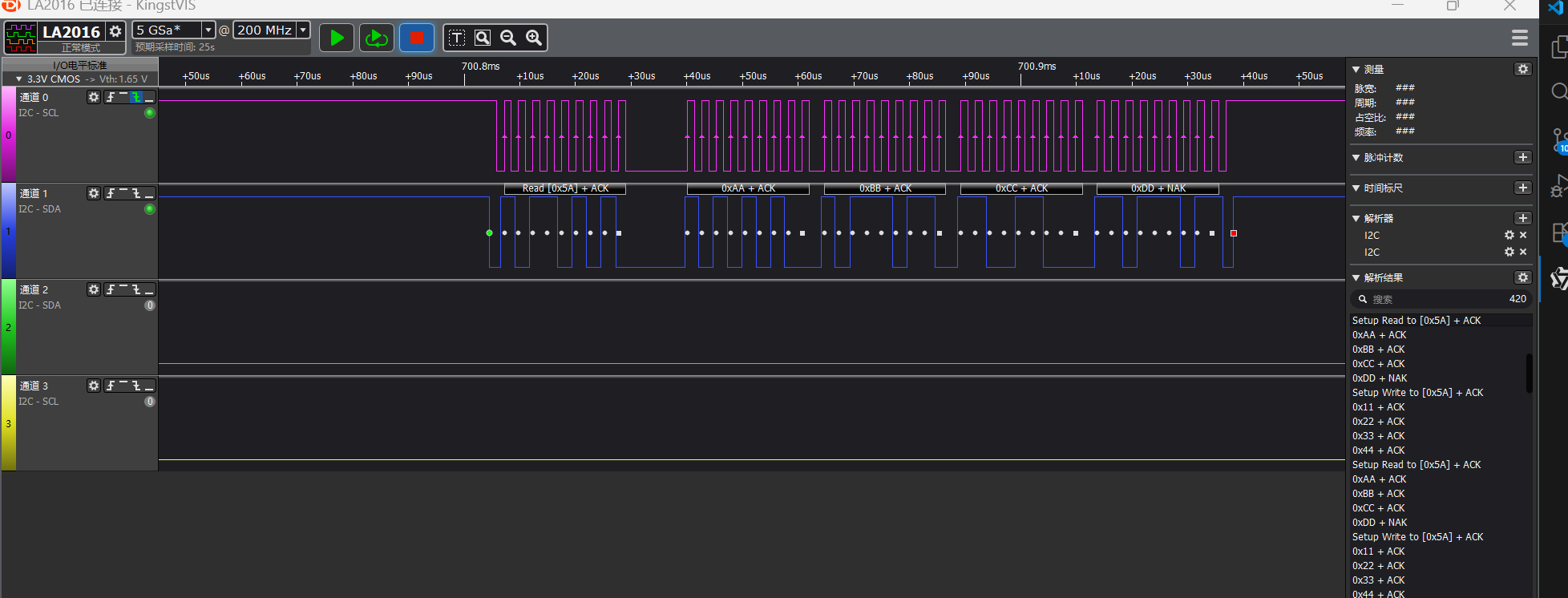
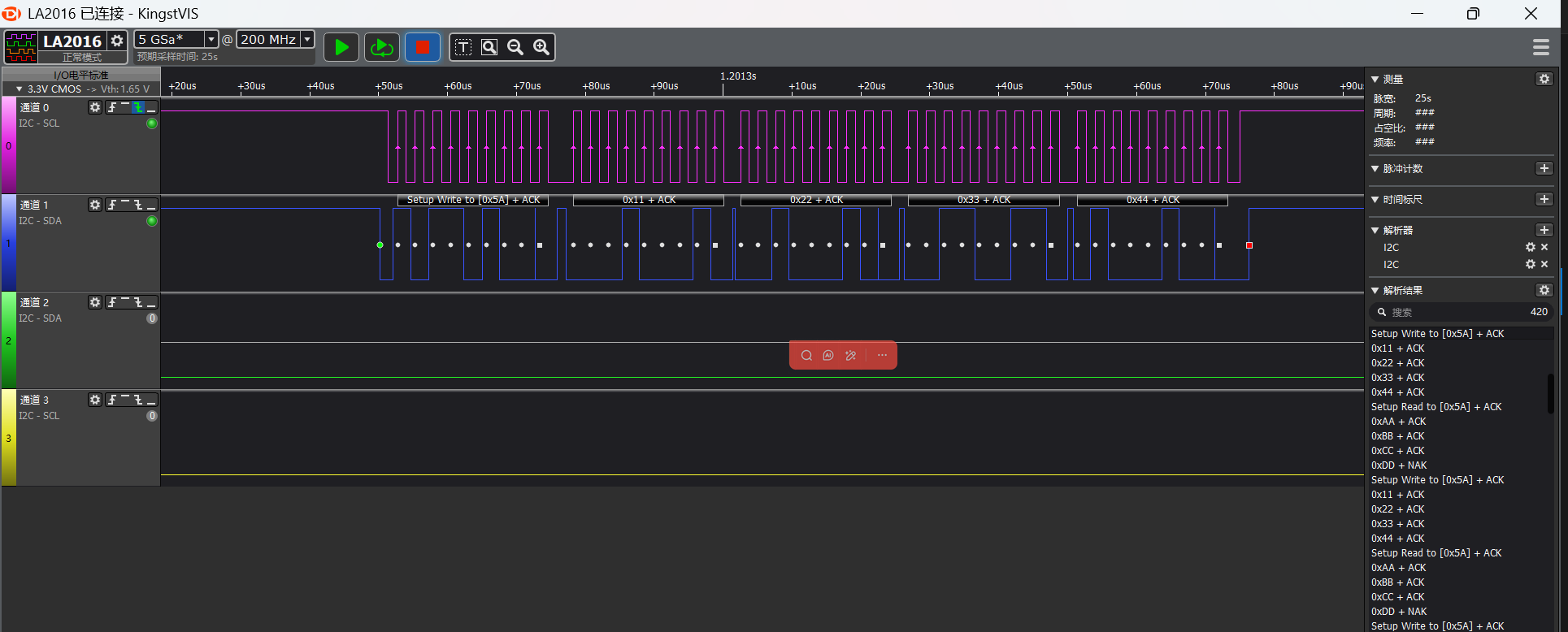
I2C Read/Write Waveforms
Waveforms captured by logic analyzer
I2C slave send (I2C master read) waveform
I2C slave receive (I2C master write) waveform
I2C Parameter Modification
See comments in I2C_Slave_init function
void I2C_Slave_Init(void)
{
    HAL_StatusTypeDef ret;
    //pin nux
#ifdef SF32LB52X
    HAL_RCC_EnableModule(RCC_MOD_I2C2); // enable i2c2
    HAL_PIN_Set(PAD_PA41, I2C2_SCL, PIN_PULLUP, 1); // i2c io select
    HAL_PIN_Set(PAD_PA42, I2C2_SDA, PIN_PULLUP, 1);
#define SLAVE_I2C I2C2// i2c number of cpu
#elif defined(SF32LB58X)
    HAL_RCC_EnableModule(RCC_MOD_I2C6);  // enable i2c6
    HAL_PIN_Set(PAD_PB28, I2C6_SCL, PIN_PULLUP, 0); // i2c io select
    HAL_PIN_Set(PAD_PB29, I2C6_SDA, PIN_PULLUP, 0);
#define SLAVE_I2C I2C6// i2c number of cpu
#elif defined(SF32LB56X)
    HAL_RCC_EnableModule(RCC_MOD_I2C3); // enable i2c3
    HAL_PIN_Set(PAD_PA20, I2C3_SCL, PIN_PULLUP, 1); // i2c io select
    HAL_PIN_Set(PAD_PA12, I2C3_SDA, PIN_PULLUP, 1);
#define SLAVE_I2C I2C3// i2c number of cpu
#endif
    //i2c init
    hi2c.Instance = SLAVE_I2C;// i2c slave mode
    hi2c.Mode = HAL_I2C_MODE_SLAVE;
    hi2c.Init.ClockSpeed = 400000;           // i2c speed(hz)
    hi2c.Init.OwnAddress1 = SLAVE_ADDRESS;  // slave address
    hi2c.Init.AddressingMode = I2C_ADDRESSINGMODE_7BIT;// i2c 7bits device address mode
    hi2c.Init.GeneralCallMode = I2C_GENERALCALL_DISABLE;

    ret = HAL_I2C_Init(&hi2c);
    if (ret != HAL_OK) {
        rt_kprintf("I2C Init failed: %d\n", ret);
        return;
    rt_kprintf("I2C Slave Init Success!\n");
}
Based on chip type to distinguish development boards, in the initialization function, for specific chips, configure the corresponding I2C pins
For example, through
#elif defined(SF32LB52X)
chip to determine which development board is being usedThrough
#define EXAMPLE_I2C I2C2
the I2C controller number used by the chip (such as I2C6, I2C3)Finally, use the HAL_PIN_Set() function to configure the I2C SCL and SDA pins, which need to be set to pull-up mode
Note:
Except for 55x chips, PA*_I2C_UART functional IO can be configured to output I2C SDA, SCLK waveforms
The last parameter of HAL_PIN_Set is hcpu/lcpu selection, 1: select hcpu, 0: select lcpu
Troubleshooting
No I2C waveform output
Check against the chip manual whether the CPU’s I2C selection is correct
Check whether the IO configuration and connection are correct
Slave remains in waiting state
Check whether the I2C slave address is correct
Check whether the I2C slave address is occupied by other devices