
BLE Central and Peripheral with Pingpong OTA Example
Source Code Path: example/ble/central_and_peripheral_with_pingpong_ota
Supported Platforms
Projects with flash table programmed in mpi5
Overview
This example demonstrates how the platform can function as both GAP central and peripheral, as well as GATT client and server simultaneously. It also shows how to upgrade the project using the pingpong method
Example Usage
The Finsh commands for this example can be printed by entering ‘diss help’ to show command usage.
When acting as a peripheral device, it will start advertising on boot with a name formatted as SIFLI_APP-xx-xx-xx-xx-xx-xx, where xx represents the device’s Bluetooth address. You can connect using a mobile BLE APP.
When acting as a central device, you can search for other peripheral devices through finsh commands and initiate connections.
When acting as a GATT server, you can perform write and read operations on the mobile terminal, or enable CCCD, and the device will update the characteristic value every second.
When acting as a GATT client, you can search and display the server’s database through finsh commands, and perform read or write operations on characteristic values.
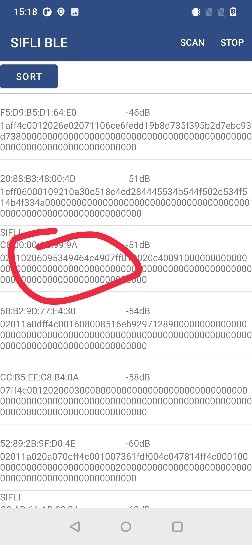
Connect the board through the SIFLE BLE APP, select a file, and perform the upgrade
Hardware Requirements
Before running this example, you need to prepare:
A development board supported by this example (Supported Platforms).
A mobile device.
Other Access Related Notes
SConstruct FTAB needs to be added via addchildproj:

ptab.json Need to allocate a main and base2 region with the same size as HCPU_FLASH_CODE_LOAD_REGION as the pong region:
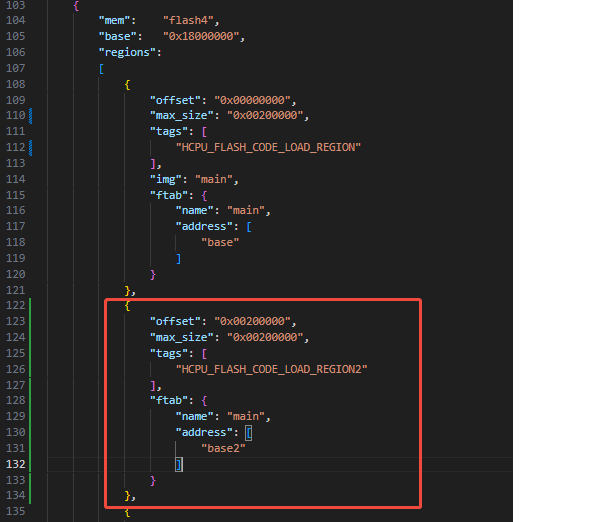
Boot loader Need to add jump logic, please refer to the implementation of this example for details:

Generation Command
.\imgtoolv37.exe gen_dfu --img_para main 0 0 --key=s01 --sigkey=sig --dfu_id=1 --hw_ver=51 --sdk_ver=7001 --fw_ver=1001001 --com_type=0 --bksize=2048 --align=0
main is the name of the bin to be upgraded. If it’s hcpu.bin, just fill in hcpu.
The first parameter after the bin name is for compression, 16 means using compression, 0 means no compression. Only no compression can be selected.
The second parameter after the bin name represents the image id, hcpu is 0, and multiple bins can be generated simultaneously.
Then you need to implement whether the subsequent bins are stored in the backup area and installed finally, or directly overwrite the target address.
5. Mobile Operation
The operation is shown in the following figure: search for the board’s BLE broadcast, click on the corresponding device, then select nand dfu, first select the ctrl file, then select hcpu as the outmain.bin generated刚才制作的outmain.bin, and finally click the start button.



Compilation and Flashing
Switch to the example project directory and run the scons command to compile:
> scons --board=sf32lb58-lcd_n16r64n4 -j8
Switch to the example project/build_xx directory, run uart_download.bat, and select the port as prompted to download:
$ ./uart_download.bat
     Uart Download
please input the serial port num:5
For detailed steps on compilation and downloading, please refer to the relevant introduction in Quick Start.
Expected Results
After the example starts up:
The board can be discovered and connected by a mobile BLE APP, which can perform GATT characteristic read/write operations.
The board can scan for other BLE devices, connect to them, discover their GATT database, and perform GATT read/write operations.
The upgrade can be performed via the APP. You can confirm whether the upgrade succeeded through the following steps:
a. First compile and flash a firmware build to the board as the original firmware before the upgrade.
b. Open
src/main.c, add the following line at the beginning of themainfunction, then save and recompile (recompiling is enough — do not flash it to the board again, otherwise the log would be printed before the upgrade):rt_kprintf("Upgrade succeeded\n");
c. Use the firmware recompiled in step b to build the HCPU upgrade package, then perform the upgrade via the APP. If the upgraded firmware prints “Upgrade succeeded” over the serial port at runtime, the upgrade succeeded.
Troubleshooting
Reference Documentation
Update History
Version |
Date |
Release Notes |
|---|---|---|
0.0.1 |
07/2025 |
Initial version |
No newline at end of right file. |