DFU_PAN OTA Upgrade User Guide
1. Overview
DFU_PAN is an OTA firmware upgrade middleware based on Bluetooth PAN network, which allows devices to connect to OTA servers via Bluetooth network, download and update firmware. The entire process includes device registration, version checking, firmware downloading and updating steps.
To use the DFU_PAN feature, add the examplele/dfu_pan sub-project and combine with middleware/dfu_pan middleware
Add to main program project/proj.conf file to enable DFU_PAN function
CONFIG_USING_DFU_PAN=y
Need to add sub-project syntax under main project’s project/SConstruct file:
AddDFU_PAN(SIFLI_SDK)
Location is usually below DoBuilding(TARGET, objs)
Refer to example/bt/pan_ota example for using DFU_PAN
2. Workflow Overview
1. Device Startup → 2. Device Registration → 3. Version Check → 4. Set Update Flag → 5. Reboot to OTA Mode
     ↓
6. DFU_PAN Program Runs → 7. Download Firmware → 8. Verify Firmware → 9. Reboot to Normal Mode
3. Detailed Usage Steps
3.1 Device Registration Process
When connecting for the first time, the device needs to register with the OTA server so the server can identify the device and record device information.
Implementation: dfu_pan provides a registration interface, applications need to prepare device information, optional parameters can be omitted
// Device registration request parameters structure
typedef struct {
    const char* mac;          // MAC address (required)
    const char* model;        // Device model (required)
    const char* solution;     // Solution name (required)
    const char* version;      // Current version (required)
    const char* ota_version;  // OTA version (required)
    const char* screen_width; // Screen width (optional)
    const char* screen_height;// Screen height (optional)
    const char* flash_type;   // Flash type (optional)
    const char* chip_id;      // Chip ID (required)
} device_register_params_t;
Process:
Construct device registration parameters:
MAC address
Device model
Solution name
Current version number
OTA version number
Chip ID (unique ID generated using SHA256)
ota_server_url:https://xxx.xxx.com
Call
dfu_pan_register_device(ota_server_url, ®_params)
dfu_pan_register_device internal POST request API:https://xxx.xxx.com/register
Example:
// Construct registration parameters
device_register_params_t reg_params = {0};
reg_params.mac = get_mac_address();
reg_params.model = "sf32lb52-lchspi-ulp";
reg_params.solution = "SF32LB52_ULP_NOR_TFT_CO5300";
reg_params.version = VERSION;
reg_params.ota_version = VERSION;
reg_params.chip_id = get_client_id();
// Execute registration
int result = dfu_pan_register_device("https://xxx.xxx.com", ®_params);
json:
{
      "mac": "Required",
      "model": "Required",
      "solution": "Required",
      "version": "Required",
      "ota_version": "Required",
      "screen_width": "Optional",
      "screen_height": "Optional",
      "flash_type": "Optional",
      "chip_id": "Required"
    }
Note: The solution, model fields should preferably match the folder names, such as folder structure "https://xxx.xxx.com/v2/xiaozhi/SF32LB52_ULP_NOR_TFT_CO5300/sf32lb52-lchspi-ulp?chip_id=%s&version=latest"
3.2 Version Check Process
After successful registration, the device can query the server for new firmware versions.
Process:
Build query URL containing the device’s chip_id and current version
Call
dfu_pan_query_latest_version()to check for latest versionIf there is a new version, save firmware information to Flash
// Build query URL
char* chip_id = get_client_id();
char* dynamic_ota_url = build_ota_query_url(chip_id);
// Query latest version
int result = dfu_pan_query_latest_version(dynamic_ota_url, VERSION,
                                       latest_version, sizeof(latest_version));
Where build_ota_query_url needs to be implemented by the application side for building the URL,
Example:
dynamic_ota_url :"https://xxx.xxx.com/v2/xiaozhi/SF32LB52_ULP_NOR_TFT_CO5300/sf32lb52-lchspi-ulp?chip_id=%s&version=latest"
//where SF32LB52_ULP_NOR_TFT_CO5300/sf32lb52-lchspi-ulp is based on server file deployment hierarchy
Note: dfu_pan_query_latest_version() retrieves JSON data returned from the server and writes the firmware structure to flash address for direct download later, JSON as follows, where v1.3.9.bin is a placeholder file that needs to be placed with firmware files and match the current folder name
{
  "result": 200,
  "message": "Success",
  "data": [
    {
      "name": "v1.3.9",
      "thumb": null,
      "zippath": "https://xxx.xxx.com/download?path=xiaozhi/SF32LB52_ULP_NOR_TFT_CO5300/sf32lb52-lchspi-ulp/v1.3.9/v1.3.9.bin",
      "files": [
        {
          "file_id": 391,
          "file_name": "ER_IROM3.bin",
          "file_size": 4087608,
          "crc32": "0x1026622b",
          "addr": "0x12460000",
          "region_size": "0x00680000",
          "note": null,
          "name": "ER_IROM3.bin",
          "url": "https://xxx.xxx.com/download?path=xiaozhi/SF32LB52_ULP_NOR_TFT_CO5300/sf32lb52-lchspi-ulp/v1.3.9/ER_IROM3.bin"
        },
        {
          "name": "v1.3.9.bin",
          "url": "https://xxx.xxx.com/download?path=xiaozhi/SF32LB52_ULP_NOR_TFT_CO5300/sf32lb52-lchspi-ulp/v1.3.9/v1.3.9.bin",
          "addr": "",
          "size": "",
          "crc32": "",
          "region_size": "",
          "note": ""
        },
        {
          "file_id": 389,
          "file_name": "ER_IROM1.bin",
          "file_size": 2036952,
          "crc32": "0xbffebc91",
          "addr": "0x12218000",
          "region_size": "0x00240000",
          "note": null,
          "name": "ER_IROM1.bin",
          "url": "https://xxx.xxx.com/download?path=xiaozhi/SF32LB52_ULP_NOR_TFT_CO5300/sf32lb52-lchspi-ulp/v1.3.9/ER_IROM1.bin"
        },
        {
          "file_id": 390,
          "file_name": "ER_IROM2.bin",
          "file_size": 3939852,
          "crc32": "0x32d58690",
          "addr": "0x12AE0000",
          "region_size": "0x00400000",
          "note": null,
          "name": "ER_IROM2.bin",
          "url": "https://xxx.xxx.com/download?path=xiaozhi/SF32LB52_ULP_NOR_TFT_CO5300/sf32lb52-lchspi-ulp/v1.3.9/ER_IROM2.bin"
        }
      ]
    }
  ]
}
Firmware Information Structure:
struct firmware_file_info {
    char name[48];         // File name
    char url[256];         // Download URL
    uint32_t addr;         // Flash address
    uint32_t size;         // File size
    uint32_t crc32;        // CRC32 checksum
    uint32_t region_size;  // Region size
    uint32_t file_id;      // File ID
    uint32_t needs_update; // Update flag
    uint32_t magic;        // Magic number
};
3.3 Setting Update Flag
When a new version is detected, the update flag needs to be set so that the device enters OTA mode on next boot.
Process:
User clicks “Update” button on UI, or at specific trigger update operation location
Call
dfu_pan_set_update_flags()to set update flagSystem reboots
// Set update flag
if (dfu_pan_set_update_flags() != 0) {
    LOG_E("Failed to mark versions for update");
    return;
}

// Reboot system, bootloader checks magic number and update flag to enter OTA download program
HAL_PMU_Reboot();
// Where `dfu_pan_set_update_flags` sets the [magic], `needs_update` in `firmware_file_info` respectively
// Magic number definitions
#define FIRMWARE_INFO_MAGIC                                                    \
    0x64667500 // ASCII value of "dfu", ensuring 4-byte alignment
#define FIRMWARE_INFO_MAGIC_PAN                                                \
    0x70616E00 // ASCII value of "pan", ensuring 4-byte alignment
#define FIRMWARE_MAGIC_DFU_PAN                                                 \
    ((uint32_t)FIRMWARE_INFO_MAGIC << 16 | (FIRMWARE_INFO_MAGIC_PAN & 0xFFFF))

    needs_update = 1
3.4 Boot Check for Update Flag
After system reboot, the bootloader checks for update flags.
Process:
Check firmware information stored in Flash
Verify magic number and update flag
If update is needed and OTA program is valid, jump to OTA program
// Check update flag
bool needs_update = 0;
for (int i = 0; i < MAX_FIRMWARE_FILES; i++) {
    // Check magic number
    uint32_t magic_value = 0;
    g_flash_read(magic_addr, (const int8_t*)&magic_value, sizeof(uint32_t));

    if (magic_value == FIRMWARE_MAGIC_DFU_PAN) {
        // Check update flag
        uint32_t needs_update_value = 0;
        g_flash_read(needs_update_addr, (const int8_t*)&needs_update_value,
                     sizeof(uint32_t));

        if (needs_update_value) {
            needs_update = 1;
            break;
        }
    }
}

// Jump if update needed and OTA program valid
if (needs_update && is_ota_program_valid(DFU_PAN_LOADER_START_ADDR)) {
    run_img(DFU_PAN_LOADER_START_ADDR);  // Jump to OTA program
}
3.5 DFU_PAN Program Executes Firmware Download
After entering OTA mode, the DFU_PAN program automatically connects to the network and downloads firmware.
Process:
Initialize Bluetooth and connect to PAN network
Automatically check network connection status
Read firmware information from Flash
Call
dfu_pan_download_firmware()to download firmwareClear update flag and reboot after download completes
// Read firmware information
struct firmware_file_info firmware_files[MAX_FIRMWARE_FILES];
int file_count = 0;
for (int i = 0; i < MAX_FIRMWARE_FILES; i++) {
    if (dfu_pan_get_firmware_file_info(i, &firmware_files[file_count]) == 0) {
        if (firmware_files[file_count].name[0] != '\0') {
            file_count++;
        }
    }
}

// Download firmware
int ret = dfu_pan_download_firmware(firmware_files, file_count);
if (ret == 0) {
    dfu_pan_clear_files();  // Clear update flag
    HAL_PMU_Reboot();       // Reboot to normal mode
}
3.6 Firmware Download and Verification Process
Process:
Iterate through all firmware files that need updating
For each file:
Erase target Flash area
Download firmware via HTTP GET request
Write to Flash in chunks
Show download progress
Calculate and verify CRC32 checksum
// Download each firmware file
for (int i = 0; i < file_count; i++) {
    // Erase Flash
    rt_flash_erase(firmware_file_info[i].addr, aligned_size);

    // Create HTTP session
    session = webclient_session_create(PAN_OTA_HEADER_BUFSZ);

    // Send GET request
    int resp_status = webclient_get(session, firmware_file_info[i].url);

    // Download in chunks and write to Flash
    while (remaining_length > 0) {
        int bytes_read = webclient_read(session, buffer, chunk_size);
        rt_flash_write(addr, (uint8_t *)buffer, bytes_read);
    }

    // CRC verification
    uint32_t calculated_crc = calculate_crc32(verify_buffer, verify_chunk,
                                             calculated_crc);
    if (calculated_crc != firmware_file_info[i].crc32) {
        // Verification failed
        return -1;
    }
}
4. CRC32 Check Algorithm Description
The DFU_PAN OTA upgrade process uses the CRC32 check algorithm to ensure firmware data integrity. The implementation is consistent with standard CRC32 (IEEE 802.3), with the specific logic as follows:
4.1 CRC32 Algorithm Parameters
Polynomial: 0xEDB88320 (standard IEEE 802.3 CRC32 polynomial)
Initial Value: 0xFFFFFFFF
Final XOR Value: 0xFFFFFFFF
Input Data Reversal: No
Output Data Reversal: No
4.2 Algorithm Implementation
4.2.1 CRC32 Table Initialization
#define CRC32_POLY 0xEDB88320
static uint32_t crc32_table[256];

static void init_crc32_table(void)
{
    for (int i = 0; i < 256; i++)
    {
        uint32_t crc = i;
        for (int j = 0; j < 8; j++)
        {
            if (crc & 1)
                crc = (crc >> 1) ^ CRC32_POLY;
            else
                crc >>= 1;
        }
        crc32_table[i] = crc;
    }
}
4.2.2 CRC32 Calculation Function
static uint32_t calculate_crc32(const uint8_t *data, size_t length, uint32_t crc)
{
    static int crc_table_initialized = 0;

    // Ensure CRC table is initialized only once
    if (!crc_table_initialized)
    {
        init_crc32_table();
        crc_table_initialized = 1;
    }

    crc = crc ^ 0xFFFFFFFF;
    for (size_t i = 0; i < length; i++)
    {
        crc = (crc >> 8) ^ crc32_table[(crc ^ data[i]) & 0xFF];
    }
    return crc ^ 0xFFFFFFFF;
}
4.3 Algorithm Workflow
Table Initialization: Initialize 256-item CRC32 lookup table on first call
Initial Value Processing: XOR initial CRC value with 0xFFFFFFFF
Data Processing: For each byte of input data:
Calculate index:
(current CRC value ^ byte value) & 0xFFUpdate CRC:
(current CRC value >> 8) ^ crc32_table[index]
Final Value Processing: XOR result with 0xFFFFFFFF to get final CRC32 value
4.4 Application in Firmware Verification
After firmware download completes, the system performs CRC32 verification to check firmware integrity:
// Read downloaded firmware data from Flash
uint8_t *verify_buffer = rt_malloc(OTA_RECV_BUFF_SIZE);
uint32_t calculated_crc = 0xffffffff;
uint32_t verify_remaining = data_written; // Actual written data size
uint32_t verify_offset = 0;

// Read in chunks and calculate CRC32
while (verify_remaining > 0)
{
    int verify_chunk = (verify_remaining > OTA_RECV_BUFF_SIZE)
                          ? OTA_RECV_BUFF_SIZE
                          : verify_remaining;

    if (rt_flash_read(firmware_file_info[i].addr + verify_offset,
                      verify_buffer, verify_chunk) != verify_chunk)
    {
        // Handle read failure
        rt_free(verify_buffer);
        return -1;
    }

    // Accumulate CRC32 calculation
    calculated_crc = calculate_crc32(verify_buffer, verify_chunk, calculated_crc);

    verify_remaining -= verify_chunk;
    verify_offset += verify_chunk;
}

// Compare calculated CRC with server-provided CRC value
if (calculated_crc != firmware_file_info[i].crc32)
{
    // CRC verification failed, firmware may be corrupted
    return -1;
}
4.5 Notes
Consistency Requirements: Server-side generated CRC32 values must use the same algorithm and parameters
Data Integrity: Entire firmware file must be completely downloaded before performing CRC check
Error Handling: CRC verification failures should terminate update process and report error
Performance Optimization: Use lookup table method to improve calculation efficiency, avoiding bit operations on each calculation
Through the above CRC32 verification mechanism, DFU_PAN can effectively ensure the integrity and correctness of firmware data during OTA upgrade processes, preventing firmware damage caused by transmission errors.
5. Firmware Package Deployment
Firmware package deployment refers to uploading firmware packages to the server for devices to download and install.
Example 1: Deploying OTA upgrade packages for Xiaozhi as an example:
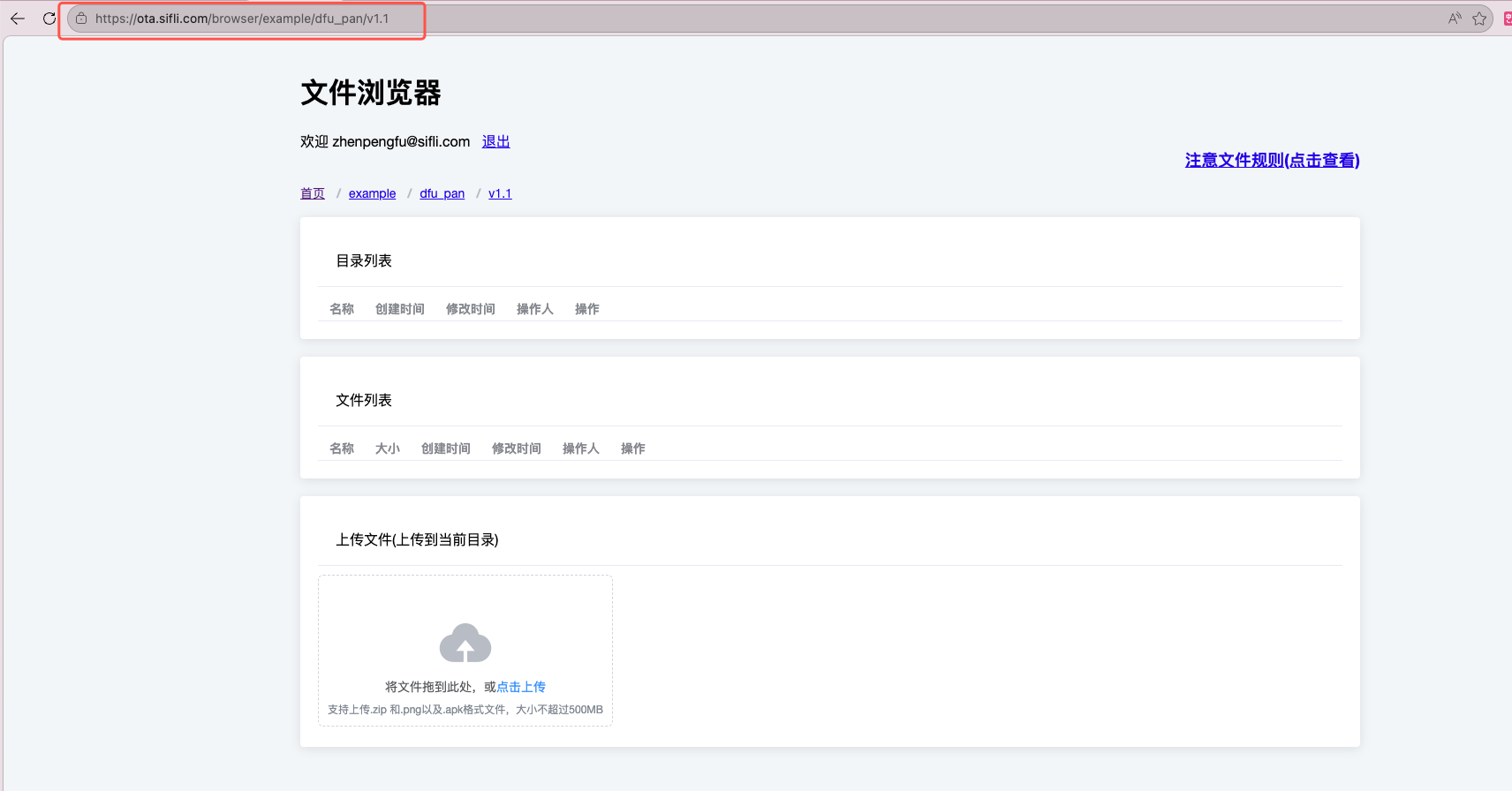
Create a directory and upload firmware packages to that directory: Note: The server address below is for internal use only https://ota.sifli.com/browser/ is the file deployment homepage, to create a directory just fill the address bar with the directory structure to be created, the last level directory name needs to be the version number such as v1.1
Upload bin file firmware packages, make sure to upload a bin file with the same name as the version directory, such as v1.1.bin in the figure, this bin file serves as a placeholder reflecting the current version, generally projects have version number iterations, so the deployed placeholder bin file needs to be higher than the current project version, upload a maximum of 3 actual functional firmwares, firmware names can start with letters
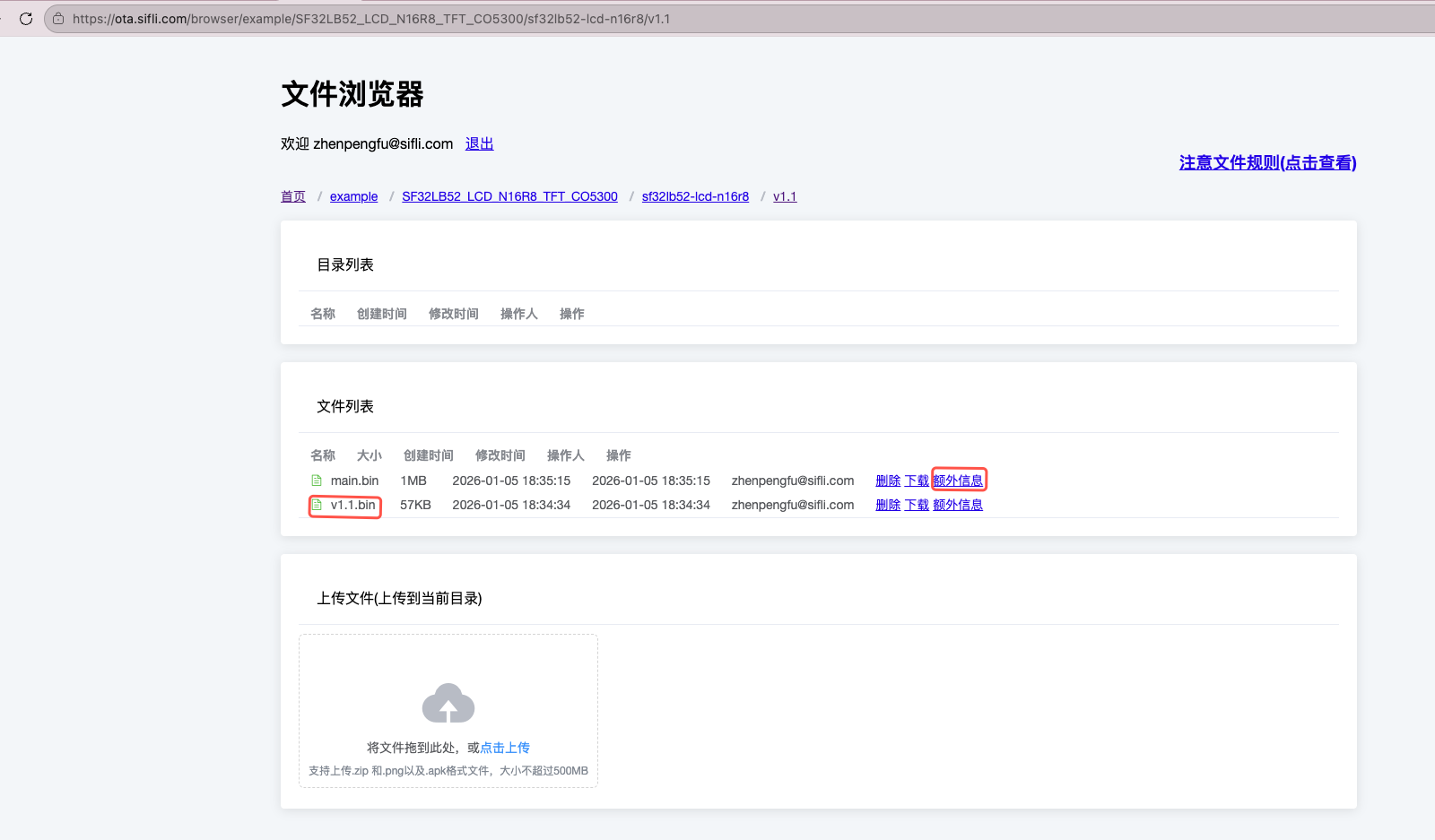
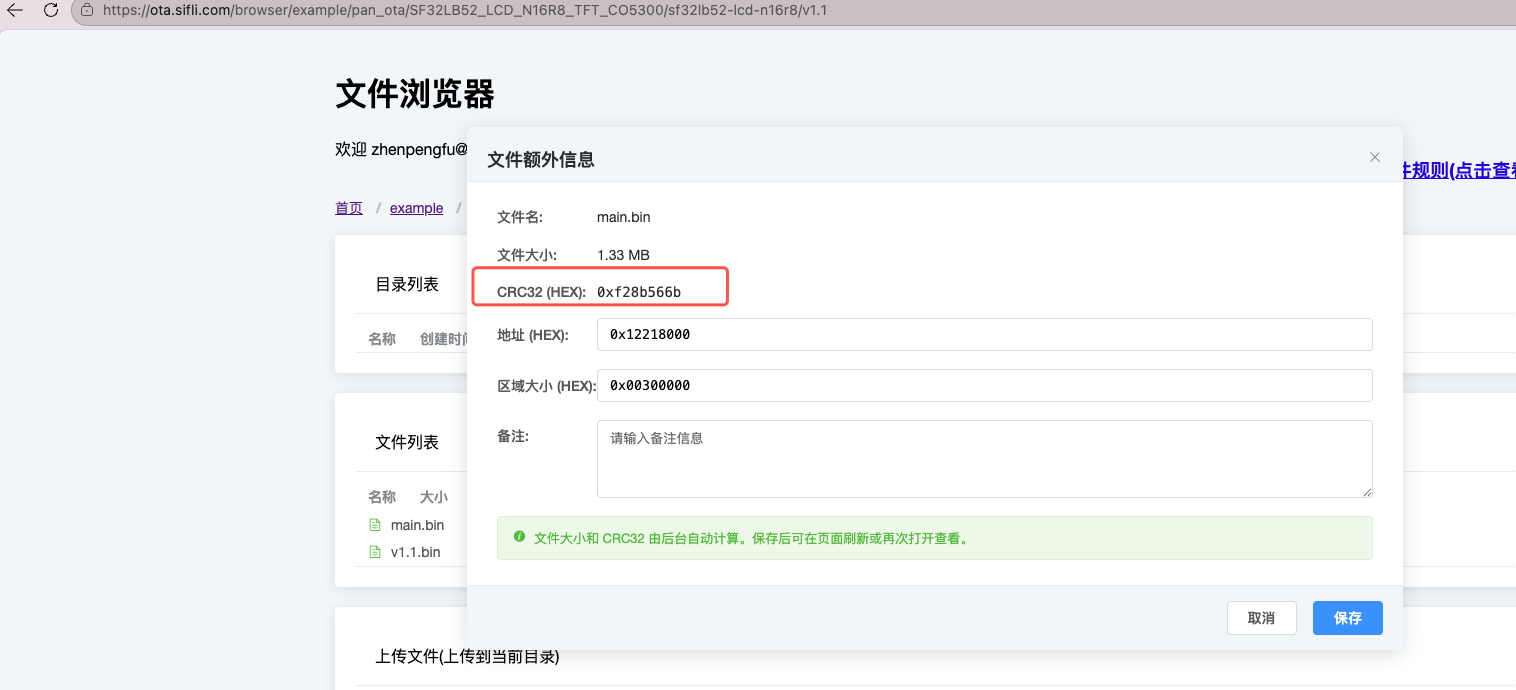
Fill in firmware information, after uploading files click extra information on the right side of each file to fill in, click save after completion, you can query firmware starting address and firmware size information according to the ptab.json used by your own program
Fill in firmware starting address
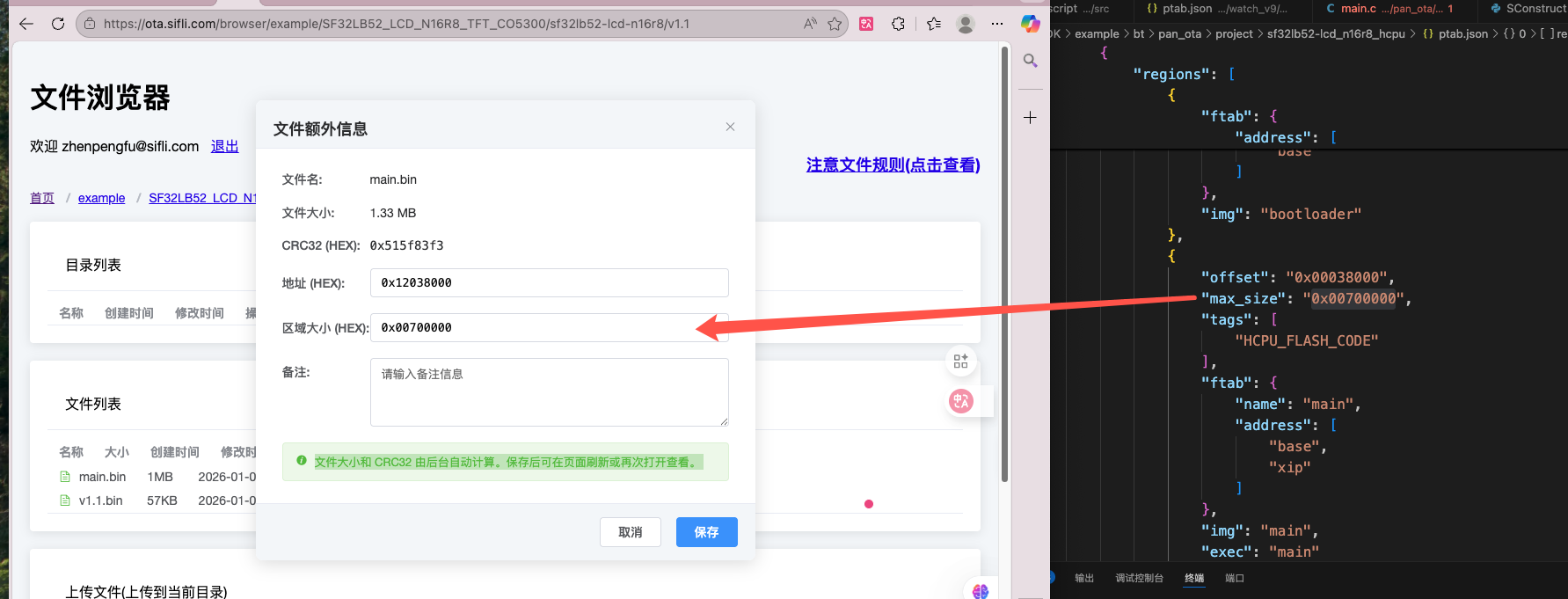 Fill in firmware region allocation size
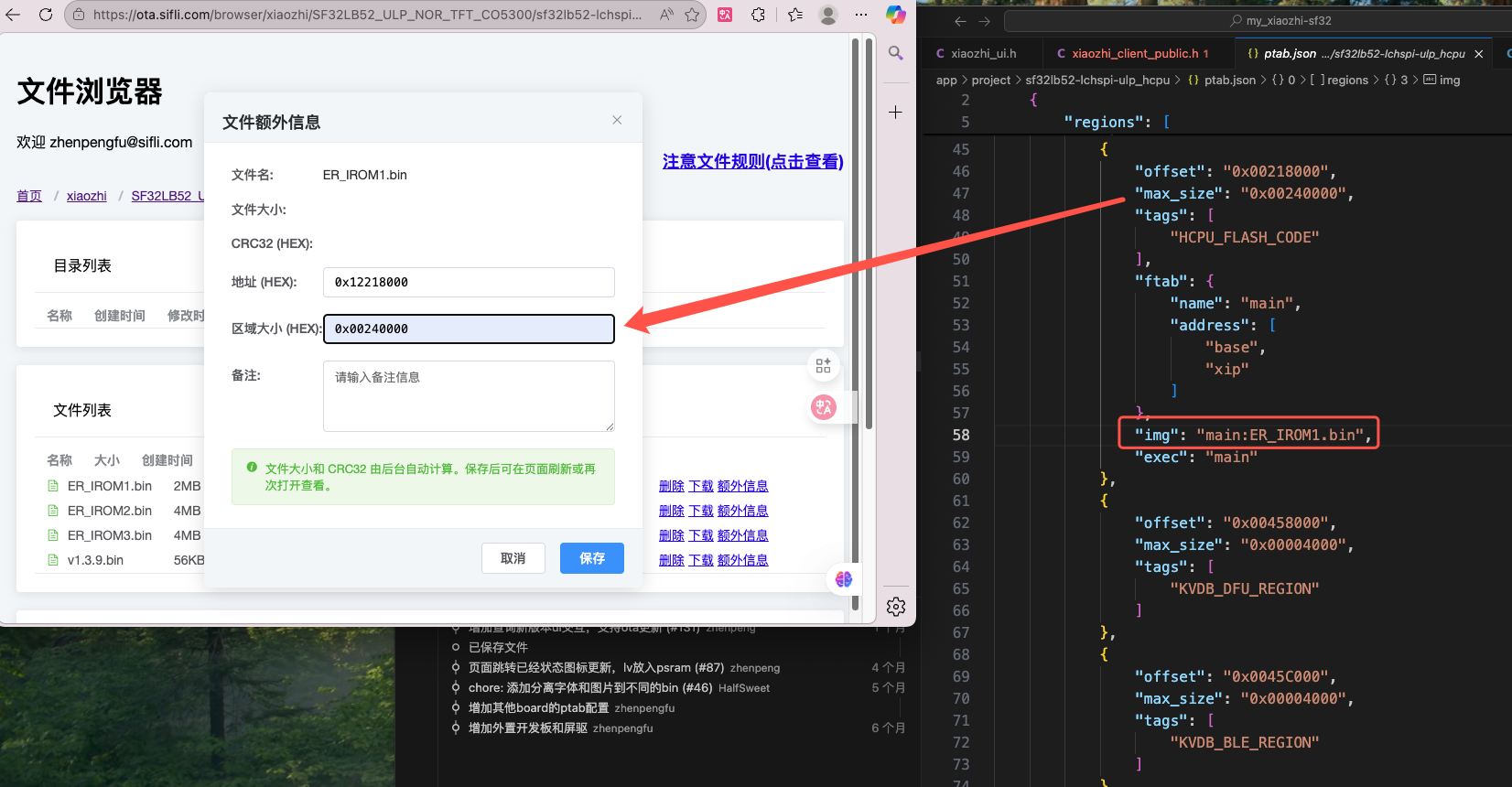
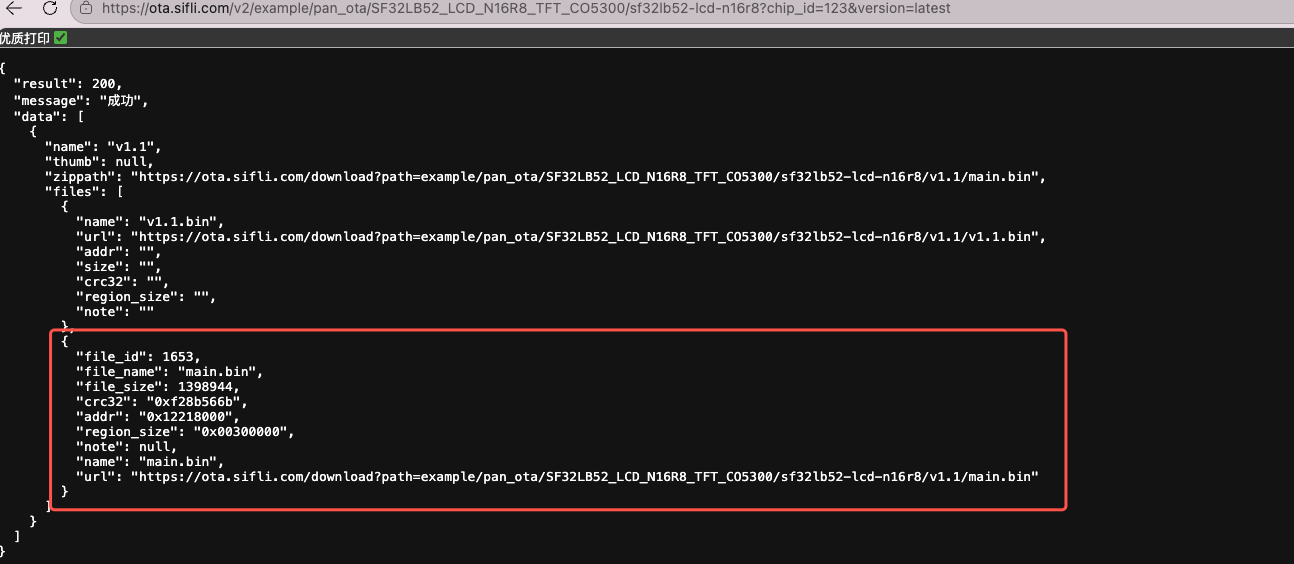
After clicking save, click extra information again to check if the crc32 value was generated
You can also check whether data can be successfully responded to according to the response address: https://ota.sifli.com/v2/xiaozhi/SF32LB52_ULP_NOR_TFT_CO5300/sf32lb52-lchspi-ulp?chip_id=123&version=latest
Note The chip_id in the address should be filled with the device ID, this is only for verifying whether the response is successful, you can fill in any string of numbers, version is filled with latest to get the latest firmware information
Example 2: example/pan_ota example
Create a directory (directory corresponds to specific code access address), fill the address bar with directory structure
https://ota.sifli.com/browser/example/pan_ota/SF32LB52_LCD_N16R8_TFT_CO5300/sf32lb52-lcd-n16r8/v1.1and upload firmware packages to that directory: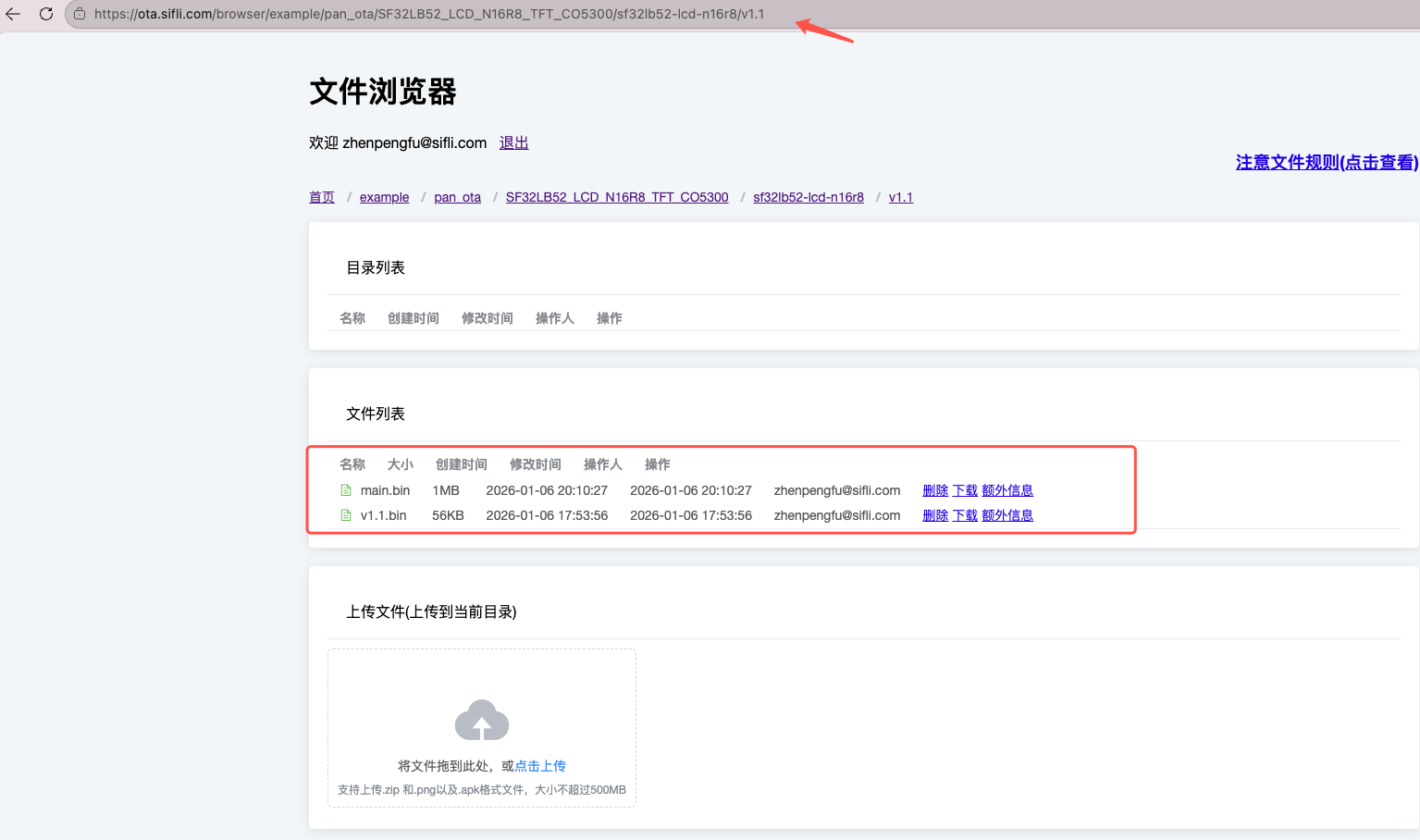
Fill in firmware information, after uploading files click extra information on the right side of each file to fill in, click save after completion, you can query firmware starting address and firmware size information according to the ptab.json used by your own program
Fill in firmware starting address
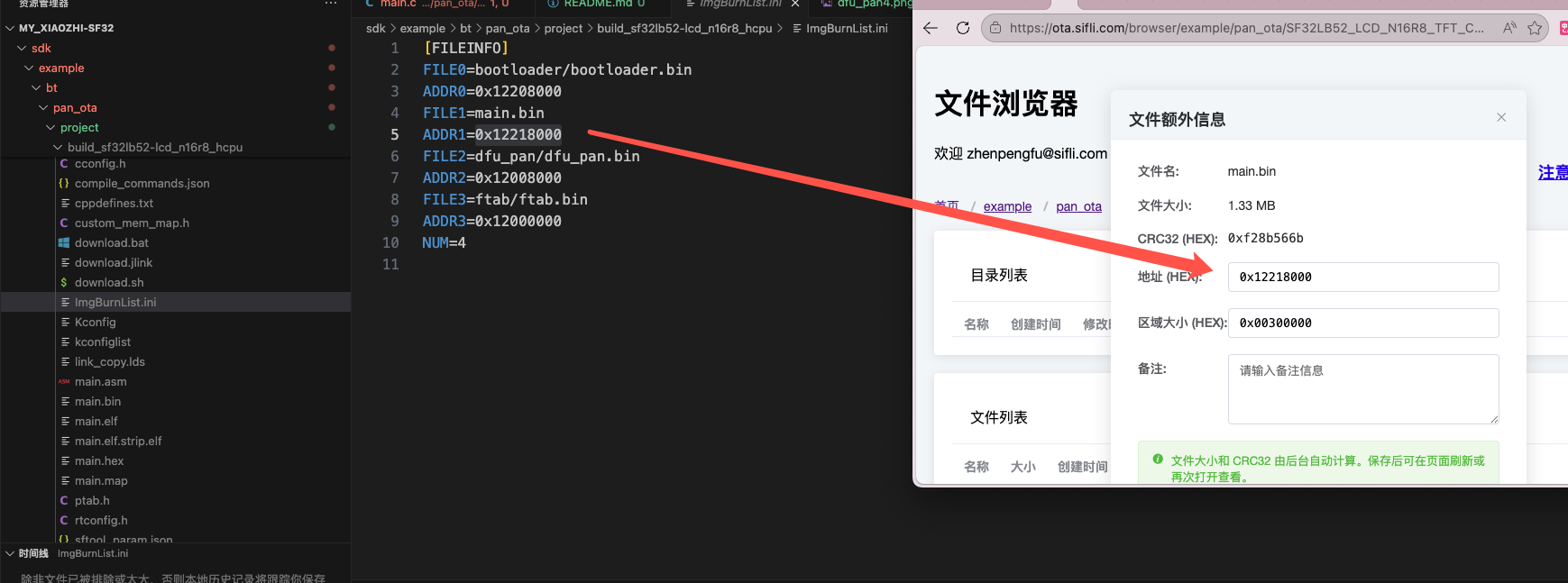
Fill in firmware region allocation size
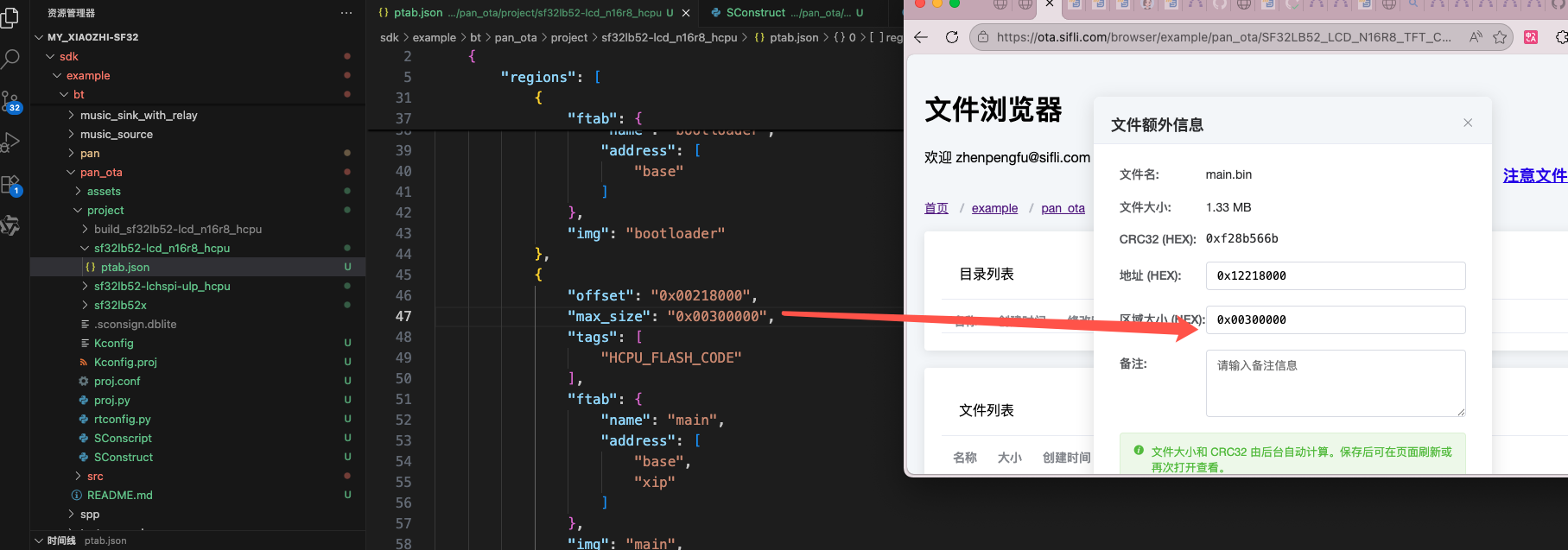
After clicking save, click extra information again to check if the crc32 value was generated
You can also check whether data can be successfully responded to according to the response address: https://ota.sifli.com/v2/example/pan_ota/SF32LB52_LCD_N16R8_TFT_CO5300/sf32lb52-lcd-n16r8?chip_id=123&version=latest