
BurnDriverEx
1. Overview
BurnDriverEx (also known as UartBurnEx) is an in-house tool developed by SiFli Technology. Its primary function is to modify flash programming drivers — controlling GPIO pin output levels and adding support for new flash chips.
Tool path: tools/BurnDriverEx
2. Environment Setup
BurnDriverEx requires no installation and runs directly on Windows (XP / 7 / 10 / 11 …).
3. Features
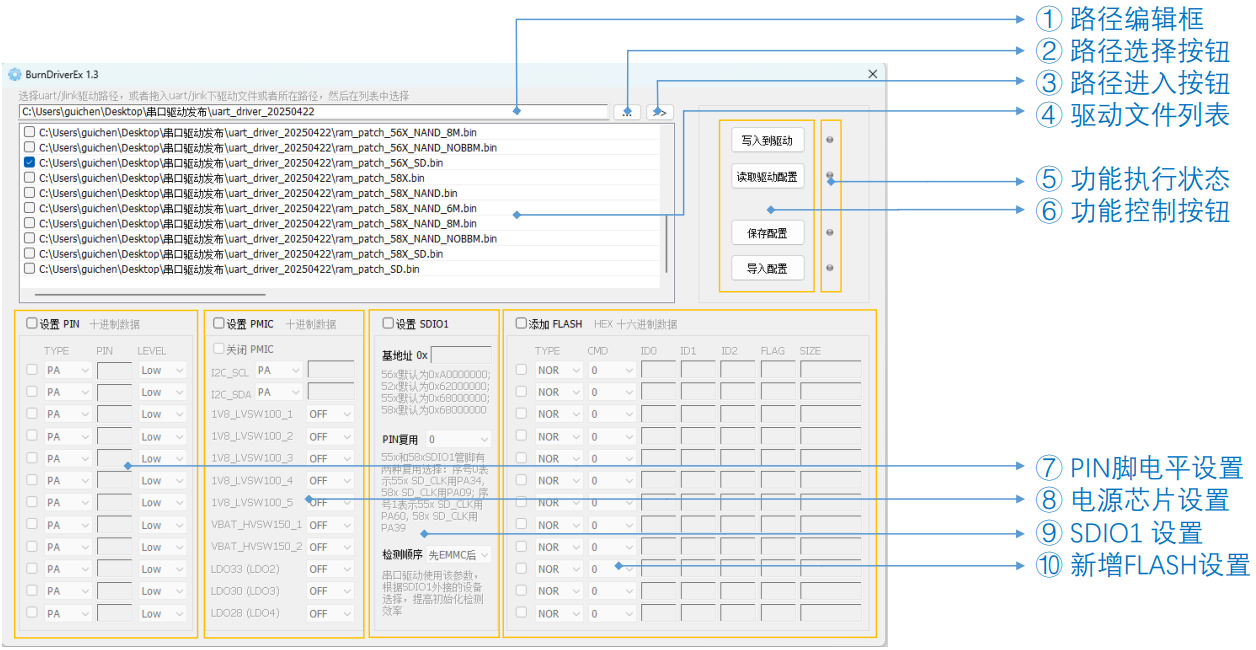
The main interface is shown above. The controls are described below:
① Path Edit Box Displays the driver directory path. You can also paste a path directly; once pasted, the driver files in that directory will appear in the driver list.
② Path Select Button Opens a folder browser to select the driver directory. After selection, driver files are shown in the driver list.
③ Open Path Button Opens the path currently shown in the path edit box, for easy browsing of driver files.
④ Driver File List Displays driver files from the selected path, or files dragged and dropped into the list.
⑤ Operation Status Shows the result of the last operation — green for success, red for failure.
⑥ Function Buttons
Write to Driver Writes the current UI configuration parameters into the selected driver file(s).
Read Driver Config Reads the configuration parameters from the first selected driver file and displays them in the UI.
Save Config Saves the current UI configuration parameters to a config file for future use.
Import Config Imports a previously saved config file and populates the UI with its parameters.
⑦ GPIO Pin Level Settings Configures up to 12 groups of GPIO pin output levels, primarily used to control power switches for external storage devices. The master switch Set PIN must be enabled for this section to take effect. Each individual pin group also requires its own enable switch to be checked. Note: pin values must be entered as decimal numbers.
⑧ PMIC Settings If the target board uses the SiFli 30147 chip as the power management IC and the supply rail is not active during flashing, this section configures the relevant parameters. The master switch Set PMIC must be enabled for this section to take effect. The 30147 is controlled by simulating I2C timing via two GPIO pins; the pins and per-channel enable states need to be configured. Confirm the exact details with your hardware team.
⑨ SDIO1 Settings Controls the connection between SDIO1 and external storage. The master switch Set SDIO1 must be enabled for this section to take effect.
Base Address The base address for the SDIO1 external storage is defined per platform in the driver. If the target board uses a different address, it must be updated here.
Pin Mux The SF32LB55X and SF32LB58X platforms support two SDIO1 pin-mux configurations; the driver defaults to one of them. Update this if the target board uses the other configuration.
Detection Order SDIO1 can connect to SD NAND / eMMC / SD peripherals. Adjusting the detection order can speed up initialization. This generally does not need to be changed.
⑩ New Flash Settings The programming driver includes a list of supported flash chips (see
readme.txtin the driver folder). If the flash on the target board is not in that list, add it here. For parameter details, refer to the Flash Configuration Guide.
4. Usage
The tool is straightforward to use. Double-click to open it and follow the steps below:
Paste the driver file path into the address bar, or use the path select button to browse. Alternatively, drag and drop driver files directly into the driver list.
Check the driver files to be modified in the driver list. Typically, all drivers for the same chip platform need to be updated.
Click Read Driver Config to load the configuration from the first selected file. This step also verifies that the tool version is compatible with the driver.
Modify the relevant configuration fields as needed, or import a previously saved config and then adjust.
Click Write to Driver to write the updated configuration back into the selected driver file(s).