
ImgStamp
1 Overview
ImgStamp is an in-house tool developed by SiFli Technology, designed as a companion tool for the offline programmer. It serves two main purposes: generating the programming files required by the offline programmer (to be copied to an SD card for offline flashing); and packaging the flash image files for each flash chip, enabling customers to send them to a third-party programmer for pre-soldering flash programming.
Tool path: tools/ImgStamp
2 Environment Setup
ImgStamp requires no installation and runs directly on Windows (XP / 7 / 10 / 11 …).
3 Features
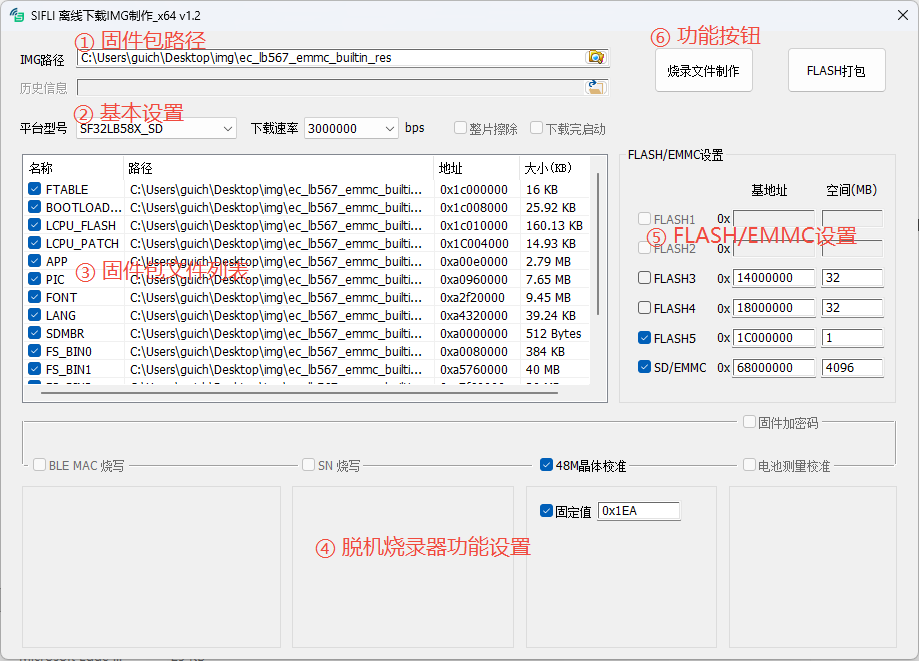
The main interface is shown above and consists of six areas.
① Firmware Package Path
Select the firmware package directory. After selection, the tool automatically scans for files and populates the list. The IMG path must contain a downfile.ini file that describes the download information for each image; this file is generated automatically when building with the SiFli build tool Butterfli.
② Basic Settings
Platform Selects the target chip platform. Choosing a platform updates the flash configuration accordingly, and the corresponding programming driver is used when generating the offline programming package. For example,
SF32LB52X_NANDmeans the chip is SF32LB52X and the external storage is NAND flash.SF32LB52X_NORindicates NOR flash;SF32LB52X_SDindicates SD NAND / eMMC / SD.Download Speed The baud rate used by the offline programmer to flash the target board over UART. The selectable range is 1 Mbps – 6 Mbps. Choose a higher rate while ensuring stability.
Full Chip Erase Controls whether the offline programmer erases the flash chip by chip (full erase) or only erases the sectors being written.
Run After Download Controls whether the offline programmer resets and boots the target board after flashing is complete.
③ Firmware File List
Displays the files found in the firmware package. Only checked files are included in the output.
④ Offline Programmer Feature Settings
BLE MAC Programming Controls whether the offline programmer writes a BLE MAC address to the target board. Two generation rules are available: random generation, or sequential increment from a starting value.
SN Programming Controls whether the offline programmer writes a serial number (SN) to the target board. Two generation rules are available: random generation, or sequential increment from a starting value.
48 MHz Crystal Calibration Controls whether the offline programmer performs 48 MHz crystal calibration on the target board. A fixed calibration value can be written (suitable when the crystal and its surrounding circuitry have good consistency), or a reference (golden) unit can be used to calibrate the target board. See … (TBD) for details.
Battery Measurement Calibration Controls whether the offline programmer performs battery measurement calibration on the target board. See … (TBD) for details.
Firmware Encryption Key Controls whether a firmware encryption key is generated based on the device UID, for software security control. This is a customer-specific customization; contact SiFli for details.
⑤ FLASH / eMMC Settings
Displays the base address and size for each flash chip. Each platform has its own default settings. Users may modify the size as needed; the base address is set according to SiFli product specifications and should not be changed.
⑥ Function Buttons
Generate Programming Files Based on the current UI configuration, generates the files required by the offline programmer. The output is placed in an
IMG_PACKETfolder under the IMG path. Copy the entire contents of that folder to the root of a microSD card and insert it into the offline programmer to use.Package FLASH Based on the flash configuration and the download files in the list, generates a packaged binary for each flash chip. Output is placed in a
FLASH_PACKETfolder under the firmware package path. This package can be programmed directly into flash chips by a third-party tool.
4 Usage
The tool is straightforward to use. Double-click to open it. The two main functions are described below.
4.1 FLASH Packaging
Use the IMG Path control to select the firmware package directory. The tool will scan and populate the file list automatically. Check the files to include; only checked files are used.
Select the chip platform and the flash chips to package. If the default SIZE does not match your product, update it accordingly.
Click Package FLASH. The packaged binary files will be generated in a
FLASH_PACKETfolder under the firmware package path.
4.2 Generating Programming Files
Use the IMG Path control to select the firmware package directory. The tool will scan and populate the file list automatically. Check the files to include; only checked files are used.
Select the chip platform. Enable Full Chip Erase and Run After Download as needed, and configure the download speed.
Enable Firmware Encryption Key, BLE MAC, SN, 48 MHz Crystal Calibration, Battery Measurement Calibration, and other features as required, and configure the corresponding parameters for each enabled feature.
Click Generate Programming Files. The output files for the offline programmer will be placed in an
IMG_PACKETfolder under the firmware package path. Copy the entire contents of that folder to the root of an SD card and insert it into the offline programmer to use.