
LVGL v8 multlist
lvsf_multlist is a high-performance scrollable list container that SiFli wraps for LVGL v8. It organizes multiple homogeneous items row by row (vertical) or column by column (horizontal), and centrally manages scrolling, inertial fling, snapping, edge bounce, scaling / visual deformation, and item-node add, remove, and query operations. It addresses the recurring need at the application layer to hand-code “scrollable + auto-snap + edge bounce + dynamic item loading”, and is commonly used in main menus, card streams, cover flows, chat message streams, and tiled (TLV) pages.
Main header: middleware/lvgl/lvsf/gui_widgets/lvsf_multlist.h
Implementation directory: middleware/lvgl/lvsf/gui_widgets/
Example project: example/multimedia/lvgl/lvgl_v8_multlist
Note
multlist itself is only a “list container”; the visual content of each item is created and destroyed dynamically by the application through create / remove callbacks. Together with lvsf_multswipe, lvsf_multedge, and lvsf_scrollbar, it forms a plug-in system in which the widgets interact through events emitted by multlist. See each widget’s documentation for details.
Features
A scrollable list in either vertical or horizontal direction, supporting inertial fling (throw), looping, and paged flipping.
Automatic snapping after a scroll ends: supports none, head, center, and tail alignment, with configurable distance / velocity thresholds.
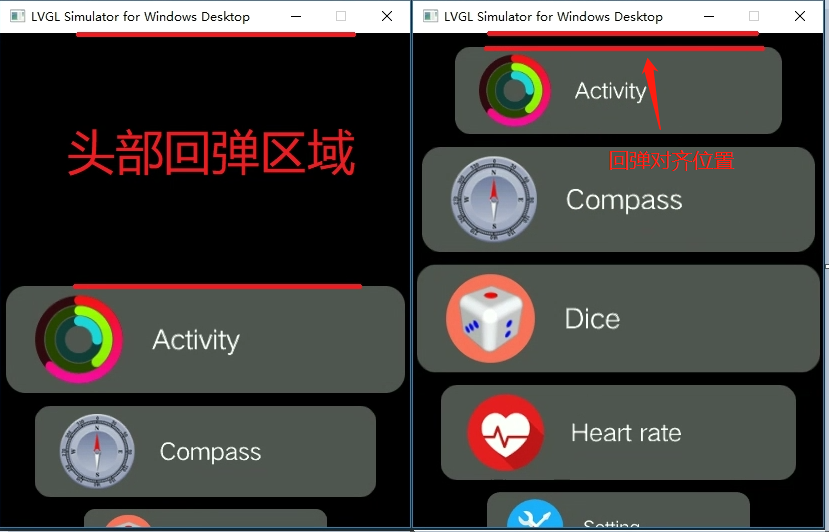
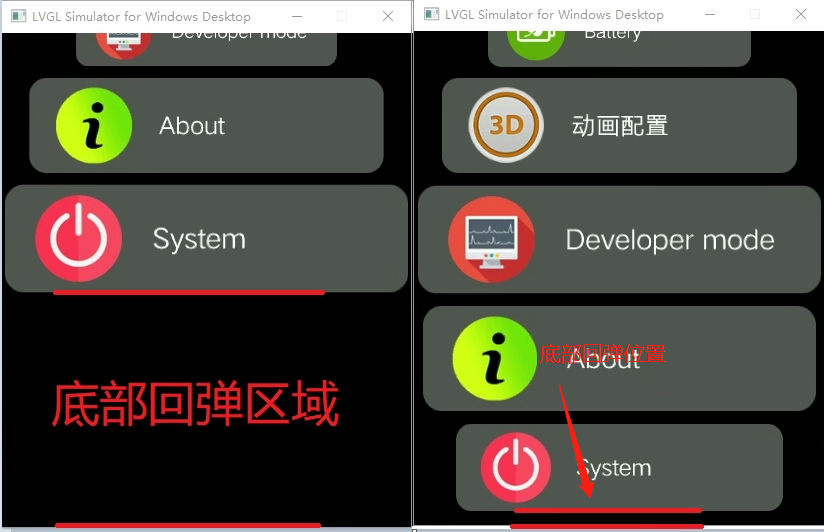
Edge bounce: the maximum drag distance and the resting position after bounce can be configured separately for the head and tail.
Dynamic items: item nodes are managed through a linked list; off-screen items are created / destroyed dynamically to save memory. Node removal with a deletion animation and reordering are supported.
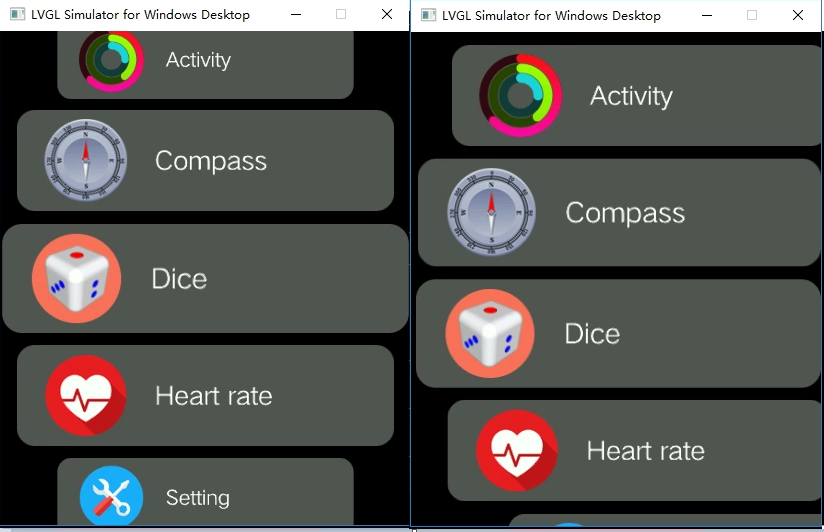
Visual deformation: the bezier scaling algorithm and the elliptical arc-offset algorithm can be enabled to produce a large center item with smaller flanking items, or an arc arrangement.
Encoder (wheel) support: item movement can be driven by a rotary encoder.
Plug-in integration: through flags and events it works together with swipe-to-delete (multswipe), side-edge (multedge), and scrollbar widgets.
Use Cases
Horizontal browsing of an app main menu / launcher icon list, card stream, or cover flow.
Horizontal / vertical carousel and page flipping of full-screen images or pages.
Chat / walkie-talkie style message streams (with item info added and removed dynamically).
Focused browsing interfaces where items animate scale, opacity, or 3D-flip transitions with the scroll distance.
List interfaces that need an external rotary encoder to switch options.
Supported Boards
The reference example example/multimedia/lvgl/lvgl_v8_multlist is verified on the following boards:
sf32lb52-lcd_n16r8
sf32lb52-lchspi-ulp
The project can be adapted to different boards with scons --board=<board> and supports the SF32LB52x / SF32LB56x / SF32LB58x series.
Configuration and Initialization
Enable the corresponding component in menuconfig (enabled by default):
CONFIG_LVSF_USE_MULTLIST=y
The widget uses a set of internal flags to control feature switches, enabled or disabled through lv_multlist_add_flag() / lv_multlist_clear_flag(). Common flags are listed below:
Flag |
Meaning |
|---|---|
|
Enables inertial fling; enabled by default |
|
Enables item looping mode |
|
When center-aligned, aligns the screen center to the item spacing (rather than the item center) |
|
Enables the bezier scaling algorithm; must be enabled after setting the bezier parameters |
|
Enables elliptical arc offset |
|
Sends an edge event when the scroll focus animation ends, for interaction with multedge |
|
Sends a scrollbar event while scrolling, for interaction with scrollbar |
|
At the end of the scroll animation, aligns the divider between two items to the center point |
|
Locks scrolling and disables swiping |
|
Dynamic snapshot mode; off-screen items are deleted |
|
Snapshots all items and keeps them without deletion |
|
Two-page / three-page refresh mode |
|
Infinite node mode |
|
Alignment when the total element length is shorter than the multlist (used in infinite mode) |
|
Defaults to head alignment when elements do not fill one screen |
Initialization Sequence
A typical sequence of creation, configuration, callback registration, node addition, and initial alignment is shown below (extracted from the example demo_multlist_list.c):
#include "lvsf_multlist.h"

lv_obj_t *list = lv_multlist_create(lv_scr_act());
lv_obj_remove_style_all(list);
lv_obj_set_size(list, LV_HOR_RES_MAX, LV_VER_RES_MAX);
lv_obj_set_style_bg_color(list, lv_color_make(82, 93, 118), 0);
lv_obj_set_style_bg_opa(list, LV_OPA_COVER, 0);
lv_obj_center(list);

/* Bezier deformation + gap + drag bounds + direction */
float para[] = { 0, 0, 0, 0.1f, 0.3f };
lv_multlist_set_bezier_para(list, LV_VER_RES_MAX, para, para);
lv_multlist_set_gap(list, 20);
lv_multlist_set_scrl_pad(list, LV_VER_RES_MAX >> 1, LV_VER_RES_MAX >> 1);
lv_multlist_set_dir(list, LV_MULTLIST_DIR_VER);

/* Register the item lifecycle callbacks, then add node info */
lv_multlist_set_item_cb(list, demo_create_item, NULL, NULL);
for (uint32_t i = 0; i < 100; i++)
{
    lv_multlist_add_info(list, LV_HOR_RES, 110, NULL, NULL);
}

/* Spring-back position and initial alignment */
lv_multlist_set_springback(list, 0, 0);
lv_multlist_align_to(list, LV_MULTLIST_ALIGN_HEAD, 0, 0, 0);
On page resume / pause, encoder and lifecycle calls are typically used together:
/* resume */
lv_multlist_on_resume(list);
lv_multlist_enable_encoder(list, 5, 400, false);

/* pause */
lv_multlist_on_pause(list);
lv_multlist_disable_encoder(list);
Warning
lv_multlist_add_info() must be passed an accurate estimate of the item width and height. A width/height error directly shifts alignment positions and makes scrollbar progress inaccurate. When aligning again after clearing all nodes, it is recommended to first reset the position to a valid pos, so that a stale out-of-range pos does not cause items to be displayed incompletely.
API Reference
The function signatures below are taken verbatim from lvsf_multlist.h.
Base Objects and Flags
Function |
Description |
Parameters / Returns |
|---|---|---|
|
Creates a multlist list object |
|
|
Gets the touch gesture direction |
Returns the current gesture direction enum |
|
Queries whether a given flag is set |
Returns non-0 if set, 0 otherwise |
|
Adds a feature flag (enables the corresponding feature) |
|
|
Clears a flag (disables the corresponding feature) |
|
|
Refreshes all items based on the current scroll position |
Call after the scroll position / properties change |
|
Checks whether the total length of all items exceeds the multlist height |
Returns true (1) if exceeded, false (0) otherwise |
Scrolling and Position
Function |
Description |
Parameters / Returns |
|---|---|---|
|
Sets the scroll position directly (no animated jump) |
|
|
Gets the current scroll position |
Returns the current scroll position (pixels) |
|
Configures the dynamic item snapshot callback and image format |
|
|
Sets the maximum draggable offset at the head and tail |
|
|
Sets an extra display area beyond which items are removed |
Defaults to 0; controls the item destruction threshold |
|
Sets the spacing between adjacent items |
|
|
Sets the scroll direction |
|
|
Gets the scroll direction |
Returns the current direction enum |
|
Sets the bounce-back resting position after an overscroll |
|
|
Computes the head bounce region position |
Returns the head bounce position (pixels) |
|
Computes the tail bounce region position |
Returns the tail bounce position (pixels) |
Alignment Control
Function |
Description |
Parameters / Returns |
|---|---|---|
|
Sets the default alignment after a scroll ends |
|
|
Sets the alignment on first use (on resume) |
|
|
Computes the scroll value needed to align a given item to the target position |
Returns the required scroll position (pixels) |
|
Scrolls by a relative offset and snaps to the nearest item |
|
|
Aligns the item at the given index to the head |
|
|
Aligns the item at the given index to the tail |
|
|
Aligns the item at the given index to the center |
|
|
Animates the given item into alignment at the target position |
|
|
Sets the distance / velocity threshold for paged snapping |
Exceeding the distance or velocity threshold triggers alignment to the next page |
Item Node Management
Function |
Description |
Parameters / Returns |
|---|---|---|
|
Adds node info to the linked list; items are dynamically loaded while scrolling |
|
|
Force-refreshes an element when item properties change |
|
|
Inserts an item before the reference item (no animation) |
Returns 1 on success, 0 on failure |
|
Removes an item with a deletion animation |
|
|
Moves an item to before the reference item |
|
|
Removes all node info added by add_info |
Often used to rebuild nodes after pause |
|
Loads all items based on the added node info |
— |
|
Gets the number of node info entries |
Returns the node count |
|
Gets the currently centered item |
Returns the centered item handle |
|
Gets the item at the current alignment point |
|
|
Gets an item handle by index |
Returns the corresponding item handle |
Deformation and Effects
Function |
Description |
Parameters / Returns |
|---|---|---|
|
Sets the bezier parameters for item scaling |
|
|
Sets the item arc (ellipse) offset |
|
|
Sets angles in circular list mode |
|
|
Sets the circular list radius |
|
|
Sets the number of stacked (overlapping) items |
Specific to stacked menus |
|
Sets the offset of the item transform center from the center |
Pivot offset used for scaling / rotation |
Animation and Callbacks
Function |
Description |
Parameters / Returns |
|---|---|---|
|
Sets the basic animation parameters |
|
|
Sets an item fly-in / fly-out animation |
|
|
Creates a custom list animation |
Returns the animation handle |
|
Sets a custom refresh callback |
Used to replace the default refresh logic |
|
Sets the paged-mode animation callback |
Triggered during multi-page refresh |
|
Sets the item transform callback |
Custom scaling / opacity / layering and other deformation |
|
Registers item lifecycle callbacks |
|
Encoder and Lifecycle
Function |
Description |
Parameters / Returns |
|---|---|---|
|
Enables encoder (wheel) control of item movement |
|
|
Disables the encoder |
— |
|
Pauses the list: removes all displayed items and stops refresh |
Called on page pause |
|
Resumes the list: reloads items and restarts refresh |
Called on page resume |
Events
multlist sends custom events to the object at specific states; the application listens through lv_obj_add_event_cb():
Event |
Meaning |
|---|---|
|
Scroll started / scrolling / scroll ended |
|
Sent when an item snaps to the target position |
|
Sent when an item leaves the aligned position |
|
Notifies the scrollbar to update its progress |
|
Edge-drag request / start / dragging / end events for multedge interaction |
|
Sent when an item is swipe-deleted |
Typical Usage
The complete runnable example is in example/multimedia/lvgl/lvgl_v8_multlist and includes sub-pages for a normal list, paged flipping, custom animation, and a chat message stream. The minimal call sequence is:
/* 1. Create and configure */
lv_obj_t *list = lv_multlist_create(lv_scr_act());
lv_multlist_set_dir(list, LV_MULTLIST_DIR_VER);
lv_multlist_set_gap(list, 20);
lv_multlist_set_scrl_pad(list, LV_VER_RES_MAX >> 1, LV_VER_RES_MAX >> 1);

/* 2. Register the item create callback (actually build each item's widget tree inside it) */
lv_multlist_set_item_cb(list, my_create_item, NULL, NULL);

/* 3. Add node info (the item's real widgets are created by the callback only when it slides onto the screen) */
lv_multlist_add_info(list, LV_HOR_RES, 110, user_info, NULL);

/* 4. Set alignment and spring-back */
lv_multlist_set_align(list, LV_MULTLIST_ALIGN_CENTER, 0);
lv_multlist_set_springback(list, 0, 0);
lv_multlist_align_center_to(list, 0, 0);

/* 5. Enable the encoder on resume; stop it on pause */
lv_multlist_on_resume(list);
lv_multlist_enable_encoder(list, 5, 400, false);
Example item create callback (extracted from the example):
static lv_obj_t *demo_create_item(lv_obj_t *parent, lv_multlist_item_t *item)
{
    lv_obj_t *item_bg = lv_obj_create(parent);
    lv_obj_remove_style_all(item_bg);
    lv_obj_set_size(item_bg, item->org_w, item->org_h);
    lv_obj_set_style_bg_color(item_bg, ITEM_BG_COLOR, LV_STATE_DEFAULT);
    lv_obj_set_style_bg_opa(item_bg, LV_OPA_100, LV_STATE_DEFAULT);
    lv_obj_add_flag(item_bg, LV_OBJ_FLAG_PRESS_LOCK | LV_OBJ_FLAG_EVENT_BUBBLE);
    lv_obj_clear_flag(item_bg, LV_OBJ_FLAG_SCROLLABLE);
    /* ... keep placing images, text, and other content on item_bg ... */
    return item_bg;
}
Demo
Standard vertical list scrolling with center snapping:

Bezier scaling deformation enabled alone (left: bezier only; right: bezier + ellipse offset):
Head bounce region (head) and tail bounce region (tail):
See Also
Header: middleware/lvgl/lvsf/gui_widgets/lvsf_multlist.h
Example project: example/multimedia/lvgl/lvgl_v8_multlist