
LVGL v8 multroller
lvsf_multroller is a declarative roller selector that SiFli wraps on top of lvsf_multlist. The application only gives it an option string separated by '\n', and it automatically lays out a looping, auto-snapping vertical list, highlighting the currently selected item in the center focus area. The selected item index can be read back with lv_multroller_get_selected().
It targets the common case of “give a set of text options and let the user scroll to pick one” (time selection, parameter configuration, mode switching, etc.), and is much simpler to use than the low-level lvsf_mulroller.
Main header: middleware/lvgl/lvsf/gui_widgets/lvsf_multroller.h
Inherits from:
lvsf_multlist, so all multlist APIs are also available on a multrollerExample project: example/multimedia/lvgl/lvgl_v8_multroller
Features
Pass a
'\n'-separated option string to automatically generate a vertical looping roller.Automatically snaps into alignment when scrolling ends; the option inside the center focus area is shown in the highlight color.
The number of visible options (default 3), the focus area size, and the highlight color are configurable.
The selected item can be set programmatically with animated positioning, and the current selected index can be read back at any time.
Inherits multlist, so its advanced APIs for direction, spring-back, and encoder can be used directly.
Use Cases
Time / date pickers (single columns or multi-column combinations of hours, minutes, months, days, etc.).
Selecting parameter items in system settings (brightness levels, language, units, mode, etc.).
Any scroll-selection interaction that “picks one from a set of preset text options”.
Supported Boards
The reference example example/multimedia/lvgl/lvgl_v8_multroller (a month picker) is verified on the following boards:
sf32lb52-lcd_n16r8
sf32lb52-lchspi-ulp
The PC simulator is also supported (scons --board=pc_hcpu). Board projects are generated with scons --board=<board> and support the SF32LB52x / SF32LB56x series.
Configuration and Initialization
Enable the corresponding component in menuconfig (enabled by default):
CONFIG_LVSF_USE_MULTROLLER=y
The recommended call order is: set size and font / color → set_show_cnt() → set_options() → set_focus_param().
#include "lvsf_multroller.h"

/* Option string: split by '\n'; the last option must also end with '\n' (leave a trailing blank line) */
static const char *MONTH_OPTIONS =
    "January\nFebruary\nMarch\nApril\nMay\nJune\n"
    "July\nAugust\nSeptember\nOctober\nNovember\nDecember\n\n";

lv_obj_t *roller = lv_multroller_create(parent);
lv_obj_set_size(roller, 240, 240);
lv_obj_set_style_bg_opa(roller, LV_OPA_TRANSP, 0);              /* Opaque by default; change to transparent */
lv_obj_set_style_text_font(roller, &lv_font_montserrat_24, 0);  /* Option font */
lv_obj_set_style_text_color(roller, lv_color_hex(0xBDBDBD), 0); /* Unselected: gray */
lv_obj_center(roller);

lv_multroller_set_show_cnt(roller, 5);                         /* Show 5 options */
lv_multroller_set_options(roller, MONTH_OPTIONS);
lv_multroller_set_focus_param(roller,
                              lv_palette_main(LV_PALETTE_RED), 240, 48); /* Highlight the center focus area */
Warning
The options string must be separated by '\n', and every option (including the last) must end with '\n', i.e. leave a trailing blank line; otherwise the last option is dropped. The string pointed to by options must remain valid for the widget’s lifetime; releasing it early causes the roller to read invalid memory.
API Reference
The function signatures below are taken verbatim from lvsf_multroller.h.
Function |
Description |
Parameters / Returns |
|---|---|---|
|
Creates a roller selector object |
|
|
Sets the number of visible options (minimum 3, default 3) |
|
|
Sets the option string |
|
|
Sets the selected item programmatically |
|
|
Sets the center focus area size and highlight text color |
|
|
Gets the index of the currently centered (selected) item |
Returns the selected item index (0 to count-1) |
Note
multroller inherits from multlist, so multlist APIs such as lv_multlist_set_dir(), lv_multlist_add_flag(), and lv_multlist_enable_encoder() act directly on a multroller object. The lv_gesture_disable() / lv_gesture_enable() calls commonly seen in the example are page-level right-swipe-back gesture management and are not part of the multroller widget API.
Typical Usage
The complete runnable example is in example/multimedia/lvgl/lvgl_v8_multroller (a month picker). The core usage is:
void demo_multroller_init(void)
{
    lv_obj_t *scr = lv_scr_act();

    lv_obj_t *roller = lv_multroller_create(scr);
    lv_obj_set_size(roller, 240, 240);
    lv_obj_set_style_bg_opa(roller, LV_OPA_TRANSP, 0);
    lv_obj_set_style_text_font(roller, &lv_font_montserrat_24, 0);
    lv_obj_set_style_text_color(roller, lv_color_hex(0xBDBDBD), 0);
    lv_obj_center(roller);

    lv_multroller_set_show_cnt(roller, 5);
    lv_multroller_set_options(roller, MONTH_OPTIONS);
    lv_multroller_set_focus_param(roller,
                                  lv_palette_main(LV_PALETTE_RED), 240, 48);

    /* The roller snaps only after release; poll get_selected() with a timer to sync the reading */
    uint16_t sel = lv_multroller_get_selected(roller);
    lv_multroller_set_selected(roller, 3, 200);   /* Select item 3, 200 ms animation */
}
When several rollers are placed side by side to form a time picker, create and configure each one independently and set its direction (horizontal / vertical is controlled by the inherited lv_multlist_set_dir()).
Demo
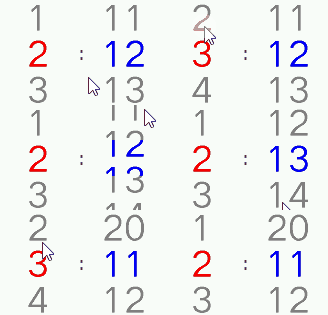
The roller scrolls, auto-snaps, and highlights the selected item in the center focus area:
See Also
Header: middleware/lvgl/lvsf/gui_widgets/lvsf_multroller.h
Example project: example/multimedia/lvgl/lvgl_v8_multroller
Related widgets:
lvsf_mulroller(low-level, callback-driven, highly customizable roller),lvsf_multlist(list container)