
Local Music Example for stereo speaker
Source code path: example/multimedia/audio/dual_adc_dac
Supported Platforms
It cannot run on the SiFli module board; it requires a board made with the sf32lb58 series chip, and the board must have two analog microphones and two analog speakers.
Overview
This example demonstrates how to record the sound of two analog microphones simultaneously, and how to choose one of the microphones for recording:
Example Usage
Hardware Requirements
Before running this example, prepare:
A board that can connect two analog microphones using the sf32lb58 chip (Supported Platforms).
Speaker.
menuconfig Configuration
This example needs to read and write files, so it needs to use a file system. Configure the
FATfile system: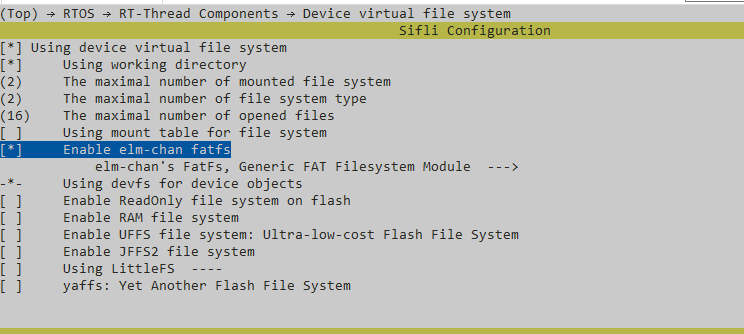
Tip
Mount root partition in mnt_init.
Enable AUDIO CODEC and AUDIO PROC:
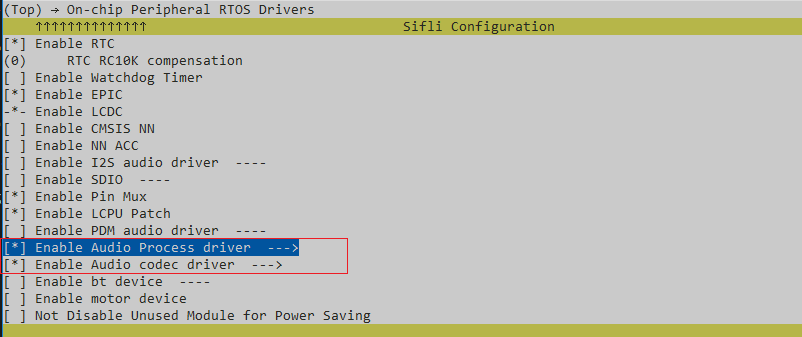
Enable AUDIO(
AUDIO):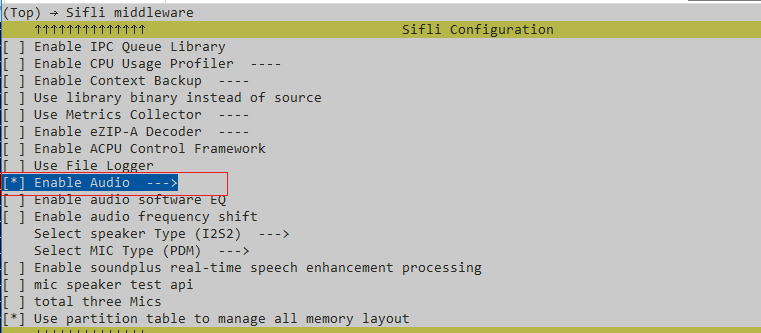
Enable AUDIO MANAGER.(
AUDIO_USING_MANAGER)
(
AUDIO_LOCAL_MUSIC)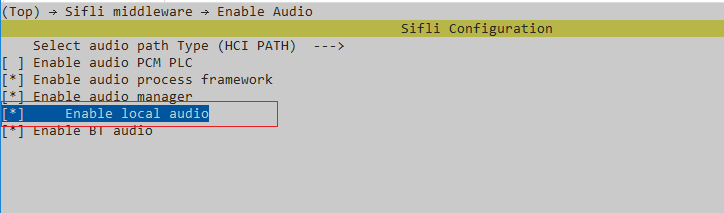
Preset audio files (also supports MP3), place them in the \disk\ directory below for preset download:
Audio files are under multimedia/audio/local_music/disk
Compilation and Programming
Because a customer-customized board is needed, it actually requires compilation using the custom board.Switch to the example project directory and run the scons command to execute compilation:
> scons --board=sf32lb58-lcd_n16r32n1_a1_dpi_hcpu -j8
Switch to the example project/build_xx directory and run uart_download.bat, select the port as prompted for download:
$ ./uart_download.bat

     Uart Download

please input the serial port num:5
For detailed steps on compilation and download, please refer to the relevant introduction in Quick Start.
Expected Results of Example
After the example starts:
input command by serial tools
mic2file
Two files will be generated after 10 seconds, which are the PCM recordings of the two microphones.
mic0_16k.pcm mic1_16k.pcm
mic2speaker 0 Use the first simulated microphone to collect data and play it on the speaker
mic2speaker 1 Use the second simulated microphone to collect data and play it on the speaker
Exception Diagnosis
Reference Documents
Update History
Version |
Date |
Release Notes |
|---|---|---|
0.0.1 |
05/2026 |
Initial version |