
LVGL v8 multedge Edge Interaction
lvsf_multedge is the edge-interaction plugin that SiFli provides for lvsf_multlist. When multlist is scrolled to its boundary, it emits an edge-drag event. If an edge object responds to this event and acknowledges it, multlist hands over display control to the edge, which then shows a sidebar, a pull-down / pull-up popup, or other content, producing a “floating window sliding out from the screen edge” effect. The event-interaction logic between the edge and multlist is encapsulated inside the widget.
Together with multlist, multswipe, and scrollbar, it belongs to the same plugin architecture: multlist triggers when scrolled to an edge, and multedge takes over the display.
Main header: middleware/lvgl/lvsf/gui_widgets/lvsf_multedge.h
Dependency:
lvsf_multlist.h
Features
Supports four edge types—left / right / top / bottom—corresponding to sidebars, pull-down, and pull-up popups.
A check callback or a specified item index determines which list item the edge interaction acts on.
The threshold distance for expanding / collapsing the edge is configurable.
Internally, it completes the “request—acknowledge—drag—finish” handoff with multlist through events; the application only needs to create and configure the edge object.
Use Cases
Left / right sidebars of a tiled (TLV) page.
A top pull-down message box or a bottom pull-up menu.
Any interaction that “drags a floating window out from the screen edge”.
Supported Boards
multedge has no standalone SDK example; it is used as a plugin of multlist, so its runtime environment matches the lvgl_v8_multlist example:
sf32lb52-lcd_n16r8
sf32lb52-lchspi-ulp
Configuration and Initialization
Enable the corresponding component in menuconfig (enabled by default):
CONFIG_LVSF_USE_MULTEDGE=y
When creating an edge object, its parent must be the multlist widget itself. First lay out the edge’s appearance (background, size, position), then set the edge type, the item binding method, and the threshold:
#include "lvsf_multedge.h"

/* Left sidebar */
lv_obj_t *left_egd = lv_multedge_create(multlist);   /* parent must be multlist */
lv_obj_remove_style_all(left_egd);
lv_obj_set_size(left_egd, SIDEBAR_W, LV_VER_RES_MAX);
lv_obj_align_to(left_egd, multlist, LV_ALIGN_OUT_LEFT_MID, 0, 0);
lv_obj_set_style_bg_color(left_egd, LV_COLOR_BLACK, LV_STATE_DEFAULT);
lv_obj_set_style_bg_opa(left_egd, LV_OPA_80, LV_STATE_DEFAULT);

lv_multedge_set_type(left_egd, LV_EDGE_LEFT);                 /* left edge */
lv_multedge_set_item_index(left_egd, 0);                     /* trigger only when the item index is 0 */
lv_multedge_set_threshold(left_egd, -SIDEBAR_W + 5, -5);      /* expand / collapse threshold */
You can also use a check callback instead of a fixed index, deciding inside the callback whether dragging the edge is allowed based on the item content:
static int shortcut_check_item(lv_multlist_item_t *item)
{
    /* returning true allows the edge to slide out; returning false keeps it in place */
    return my_item_is_wf(item);
}

lv_multedge_set_check_cb(top_egd, shortcut_check_item);
Warning
The parent of
lv_multedge_create(parent)must be the multlist widget object; otherwise the event linkage will not take effect.The edge type must be a valid value
LV_EDGE_LEFT/RIGHT/TOP/BOTTOM.The threshold start / end must be set according to the actual coordinate range; too small or too large values cause unresponsive interaction or false triggers.
API Reference
The function signatures below are taken verbatim from lvsf_multedge.h.
Function |
Description |
Parameters / Returns |
|---|---|---|
|
Create a multedge edge object |
|
|
Set the edge type |
|
|
Set the check callback that determines which item the edge interaction acts on |
|
|
Set the item index the edge interaction acts on |
Only the item at this index triggers the edge |
|
Set the edge expand / collapse threshold |
|
|
Get the current edge state |
Returns |
Typical Usage
Top Pull-Down Message Box
lv_obj_t *top_egd = lv_multedge_create(multlist);
lv_obj_remove_style_all(top_egd);
lv_obj_set_size(top_egd, LV_HOR_RES_MAX, LV_VER_RES_MAX);
lv_obj_align_to(top_egd, multlist, LV_ALIGN_OUT_TOP_MID, 0, 0);
lv_obj_set_style_bg_color(top_egd, lv_color_make(50, 50, 50), LV_STATE_DEFAULT);
lv_obj_set_style_bg_opa(top_egd, 128, LV_STATE_DEFAULT);

lv_multedge_set_type(top_egd, LV_EDGE_TOP);
lv_multedge_set_check_cb(top_egd, shortcut_check_item);
Demo
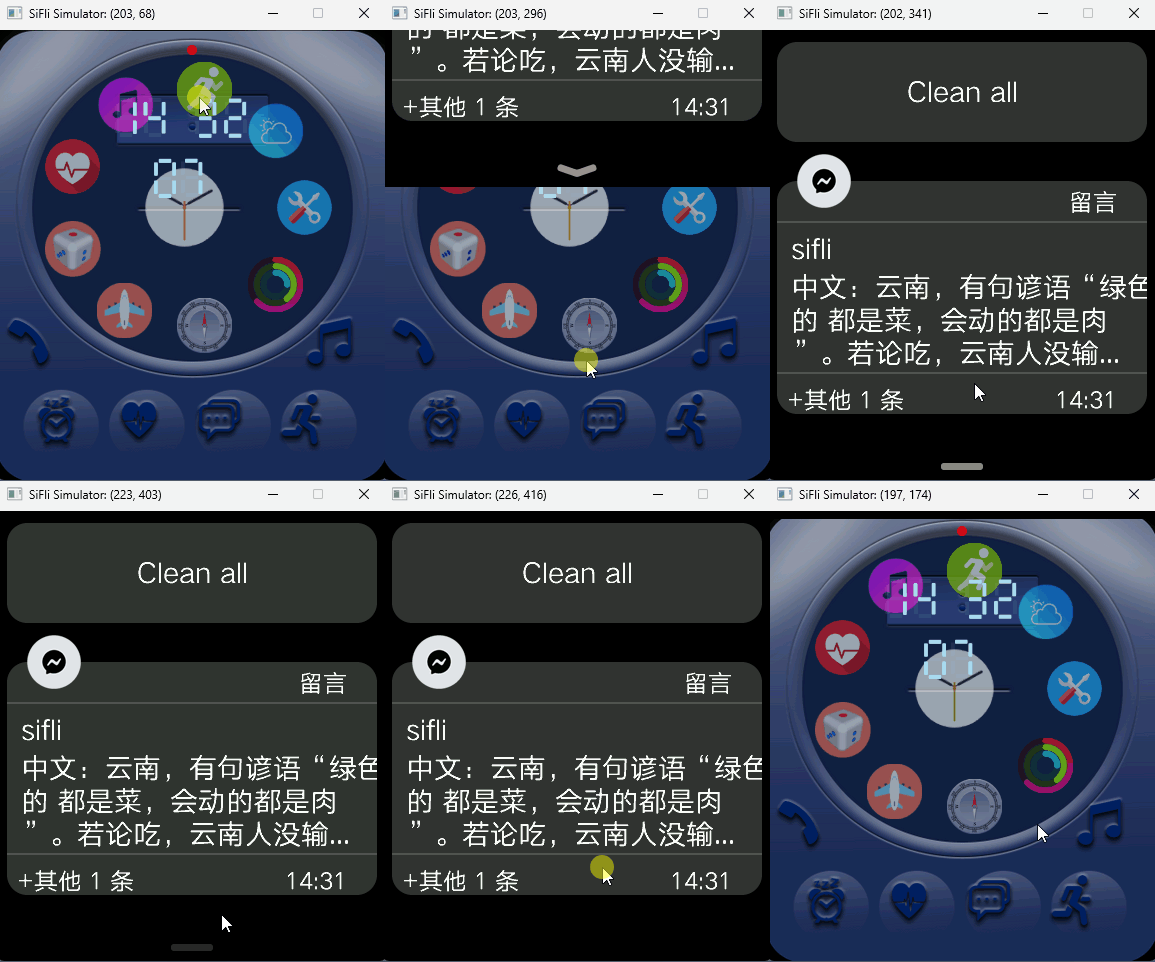
The edge-interaction effect of dragging a popup out from the screen edge:
See Also
Header: middleware/lvgl/lvsf/gui_widgets/lvsf_multedge.h
Related widgets:
lvsf_multlist(list container),lvsf_multswipe(swipe-to-delete),lvsf_scrollbar(scrollbar)