
LVGL v8 mulroller
lvsf_mulroller is a low-level, callback-driven, highly customizable roller / dial selector widget provided by SiFli. It scrolls a strip of elements by dragging; on release it automatically snaps (aligns) to the centered element as the current selection, emphasizing the center element and fading out the flanking elements, producing the classic roller look.
Unlike the declarative lvsf_multroller, mulroller does not take an option string directly; instead it fills each slot on demand through callbacks. When a slot scrolls to a new data index, appear_cb is called and fills in the content; when the roller settles, middle_cb reports the current center index. As a result, only a small number of real elements is needed to cover a large range of values, while layout, scaling, color, opacity, and looping can be finely controlled.
Main header: middleware/lvgl/lvsf/gui_widgets/lvsf_mulroller.h
Dependencies:
lvsf_baselabel,lvsf_baseimg(must be enabled in lv_conf)Example project: example/multimedia/lvgl/lvgl_v8_mulroller
Features
A draggable roller in either horizontal or vertical direction, snapping to the centered element on release.
Element content is provided on demand by the
appear_cbcallback; a few elements cover a large range of values.Supports four element types: label, image, image array, and custom module.
The scaling, color, and opacity of the center element and the flanking elements can be configured separately, producing size / color / gradient emphasis.
Supports bounded looping (stops at the boundary) and infinite looping (wraps around automatically).
Supports encoder (wheel) input, custom left / right (or top / bottom) edge objects, and custom fonts.
Use Cases
Time pickers (multi-column roller combinations of hours / minutes / seconds).
Scroll selections over a wide range of values, such as date selection (year / month / day) and weekday selection.
Image rollers, numeric dials, and selection interfaces that need a custom centered emphasis style.
Supported Boards
The reference example example/multimedia/lvgl/lvgl_v8_mulroller (a weekday + hour:minute time picker) is verified on the following boards:
sf32lb52-lcd_n16r8
sf32lb52-lchspi-ulp
The PC simulator is also supported (scons --board=pc_hcpu).
Configuration and Initialization
Enable the corresponding component in menuconfig (enabled by default):
CONFIG_LVSF_USE_MULROLLER=y
Call flow: create the object → set the element type → create elements → register content / selection callbacks → set direction / alignment / layout / looping → set scaling / color / opacity ranges → finally call lv_mulroller_validate() to apply the configuration.
#include "lvsf_mulroller.h"

/* Fill content into each slot while scrolling; idx is the data value of that slot */
static bool num_appear_cb(lv_obj_t *child, int16_t idx)
{
    lv_label_set_text_fmt(child, "%02d", idx);
    return true;
}

/* Callback when settled; idx is the current centered (selected) value */
static bool hh_middle_cb(lv_obj_t *child, int16_t idx)
{
    /* Record the selected hour and refresh the reading */
    return true;
}

lv_obj_t *r = lv_mulroller_create(parent);
lv_obj_set_size(r, 78, 156);                       /* The window must be smaller than the total element height for scrolling */
lv_mulroller_set_obj_type(r, MULROLLER_TYPE_LABEL);
lv_mulroller_create_element(r, 5, 78, 52);         /* 5 elements, 3 visible */

lv_mulroller_set_appear_cb(r, num_appear_cb);
lv_mulroller_set_middle_cb(r, hh_middle_cb);

lv_mulroller_set_dir(r, MULROLLER_DIR_VER);
lv_mulroller_set_align(r, MULROLLER_ALIGN_CENTER);
lv_mulroller_set_layout_mode(r, MULROLLER_LAYOUT_MID);
lv_mulroller_set_circle_mode(r, MULROLLER_CIRCLE_NORMAL);
lv_mulroller_set_circle_range(r, 0, 23);            /* value range 00..23 */

lv_mulroller_set_zoom_range(r, 36, 24);             /* LABEL: value = font size; large in the center, small on the sides */
lv_mulroller_set_color_mode(r, MULROLLER_COLOR_POS);
lv_mulroller_set_color_range(r, 0xFF0000, 0x9E9E9E);/* center red -> sides gray */
lv_mulroller_set_opa_mode(r, MULROLLER_OPA_MID);
lv_mulroller_set_opa_range(r, 255, 130);            /* center opaque -> sides fade out */

lv_mulroller_validate(r);                          /* Apply the settings above */
Warning
Whether scrolling is possible depends on geometry: the window must be smaller than the total size of all elements (height for vertical, width for horizontal), so create more elements than are visible.
Infinite looping mode (
MULROLLER_CIRCLE_INFINITE) cannot be used together withMULROLLER_LAYOUT_OVERLAP, and the element count must be at least 2.lv_mulroller_set_opa_range()is only effective underMULROLLER_CIRCLE_NORMAL; infinite mode ignores it.All settings take effect only after
lv_mulroller_validate()is called.
API Reference
The function signatures below are taken verbatim from lvsf_mulroller.h.
Creation and Elements
Function |
Description |
Parameters / Returns |
|---|---|---|
|
Creates a mulroller roller object |
|
|
Creates roller elements |
|
|
Sets a custom element |
Only used with |
|
Binds an attribute table |
|
|
Validates and applies the configuration |
Must be called after all settings are done |
|
Refreshes the transfer state |
For internal refresh use |
|
Gets an element background object by index |
Returns the element background object pointer |
|
Aligns all elements |
|
Direction, Type, and Layout
Function |
Description |
Parameters / Returns |
|---|---|---|
|
Sets the drag direction |
|
|
Sets the element object type |
|
|
Sets the layout mode |
Supports |
|
Sets the element alignment |
See |
|
Sets the spacing between elements |
|
|
Sets the top-left / bottom-right offset |
— |
|
Sets a custom left / right (or top / bottom) edge object |
Shown when the roller moves to the corresponding edge |
Visual Emphasis (Scale / Color / Opacity)
Function |
Description |
Parameters / Returns |
|---|---|---|
|
Sets the scaling range for the center / flanking elements |
For the LABEL type the value denotes the font size; large in the center, small on the sides |
|
Sets the color variation mode |
Currently mainly uses |
|
Sets the center / flanking color range |
LABEL type only |
|
Sets the opacity variation mode |
|
|
Sets the center / flanking opacity range |
Only effective in NORMAL looping mode |
|
Whether to show a highlight outline on the center element |
— |
|
Uses a custom font |
When |
Looping and Range
Function |
Description |
Parameters / Returns |
|---|---|---|
|
Sets the looping mode |
|
|
Sets the value range for bounded looping |
Used only by |
|
Sets the original center index at initialization |
— |
|
Gets the current center (selected) index |
Returns the current centered data index |
|
Sets the scaling factor converting each wheel (encoder) detent to a distance |
— |
|
Sets the scaling factor converting each fling (inertia) pixel to a distance |
— |
Callbacks
Function |
Description |
Parameters / Returns |
|---|---|---|
|
Called when an element enters a new data index |
Fill in the element’s display content here |
|
Called when the roller settles; reports the current center index |
The entry point for reading the selected value |
|
Called while the roller is moving |
Triggered continuously during movement |
Animation and Others
Function |
Description |
Parameters / Returns |
|---|---|---|
|
Creates a roller animation |
|
|
Deletes the current animation |
— |
|
Sets the movement percentage |
— |
|
Enables / disables element snapshots |
Available only when |
|
Extends the roller area |
Reserved in the current implementation |
|
Creates a directional mask |
Reserved in the current implementation |
|
Enables / disables encoder input |
Available only when |
Typical Usage
The complete runnable example is in example/multimedia/lvgl/lvgl_v8_mulroller, which combines a top horizontal infinite-loop weekday wheel with two vertical bounded numeric wheels (hour:minute) in the middle. The core pattern:
/* Horizontal infinite-loop weekday wheel: set direction to HOR and looping to INFINITE; in appear_cb look up the name table by idx modulo 7 */
static bool week_appear_cb(lv_obj_t *label, int16_t idx)
{
    static const char *names[7] = { "Mon", "Tue", "Wed", "Thu", "Fri", "Sat", "Sun" };
    lv_label_set_text(label, names[idx % 7]);
    return true;
}

lv_obj_t *week = lv_mulroller_create(parent);
lv_obj_set_size(week, 240, 60);
lv_mulroller_set_obj_type(week, MULROLLER_TYPE_LABEL);
lv_mulroller_create_element(week, 5, 80, 60);
lv_mulroller_set_appear_cb(week, week_appear_cb);
lv_mulroller_set_dir(week, MULROLLER_DIR_HOR);
lv_mulroller_set_circle_mode(week, MULROLLER_CIRCLE_INFINITE);
lv_mulroller_validate(week);
Note
mulroller and multroller are complementary: multroller only needs a '\n'-separated option string and suits the simple “give a set of text, pick one” case; mulroller fills content through callbacks and exposes all the details of layout / scaling / color / looping, suiting highly customized roller interfaces.
Demo
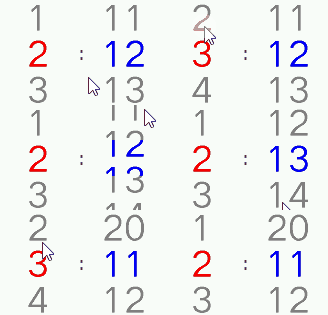
Drag, release-snap, center-emphasis with side fading effect (see the multroller roller animation):
See Also
Header: middleware/lvgl/lvsf/gui_widgets/lvsf_mulroller.h
Example project: example/multimedia/lvgl/lvgl_v8_mulroller
Related widget:
lvsf_multroller(declarative roller)