
CAN Receive Example (can_rx)
Source Path: example/hal/can/can_rx
Supported Platforms
This example can run on the following development boards.
sf32lb56-lcd
sf32lb58-lcd
Overview
This example demonstrates how to use the chip’s CAN controller to implement CAN data reception, covering filter configuration and two ways of retrieving frames (interrupt and polling).
This example operates as the receiving end (Board B) of CAN communication. Together with the can_tx example (sender, Board A), it forms one-way CAN communication between two development boards: can_tx sends and can_rx receives.
The example supports polling and interrupt modes, switched via the
USE_CAN_ITmacro. In interrupt mode, the RIF interrupt together with a semaphore synchronizes the ISR with the main loop, with no register polling required.Typical use cases derived from this example include data collection on a CAN bus and receiving issued commands.
Hardware Requirements
Two development boards with CAN support (such as sf32lb56-lcd or sf32lb58-lcd): one flashed with the can_tx example as the sender, the other flashed with this example as the receiver
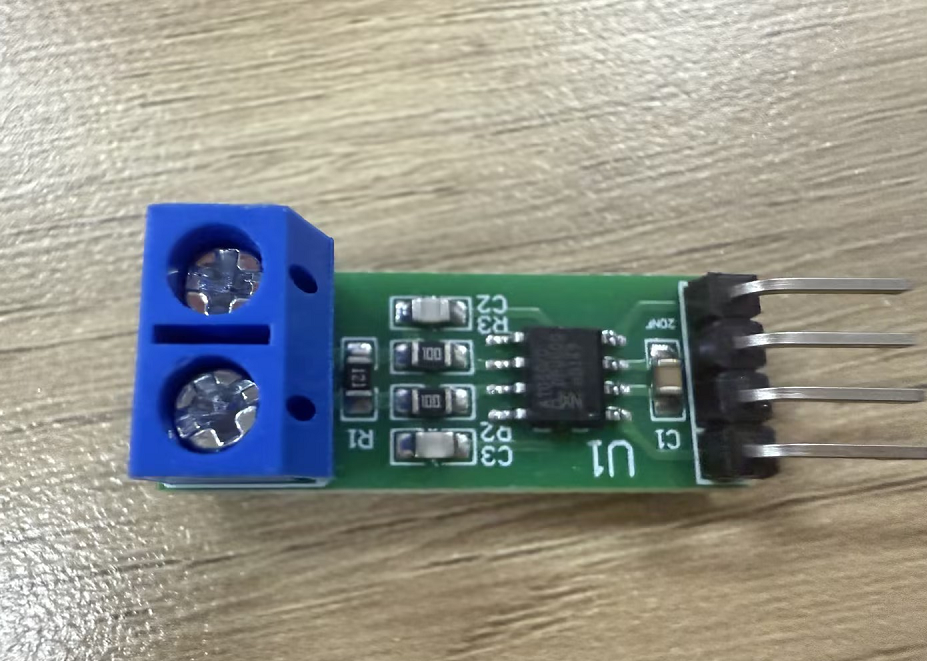
Two CAN transceiver modules (such as TJA1050, powered from 5V)
Several Dupont wires
Hardware Connection
If the board multiplexes the CAN pins with a UART, remove the series resistors on that UART first. On
sf32lb56-lcd, remove the two resistors shown below (they are on PA03/PA04).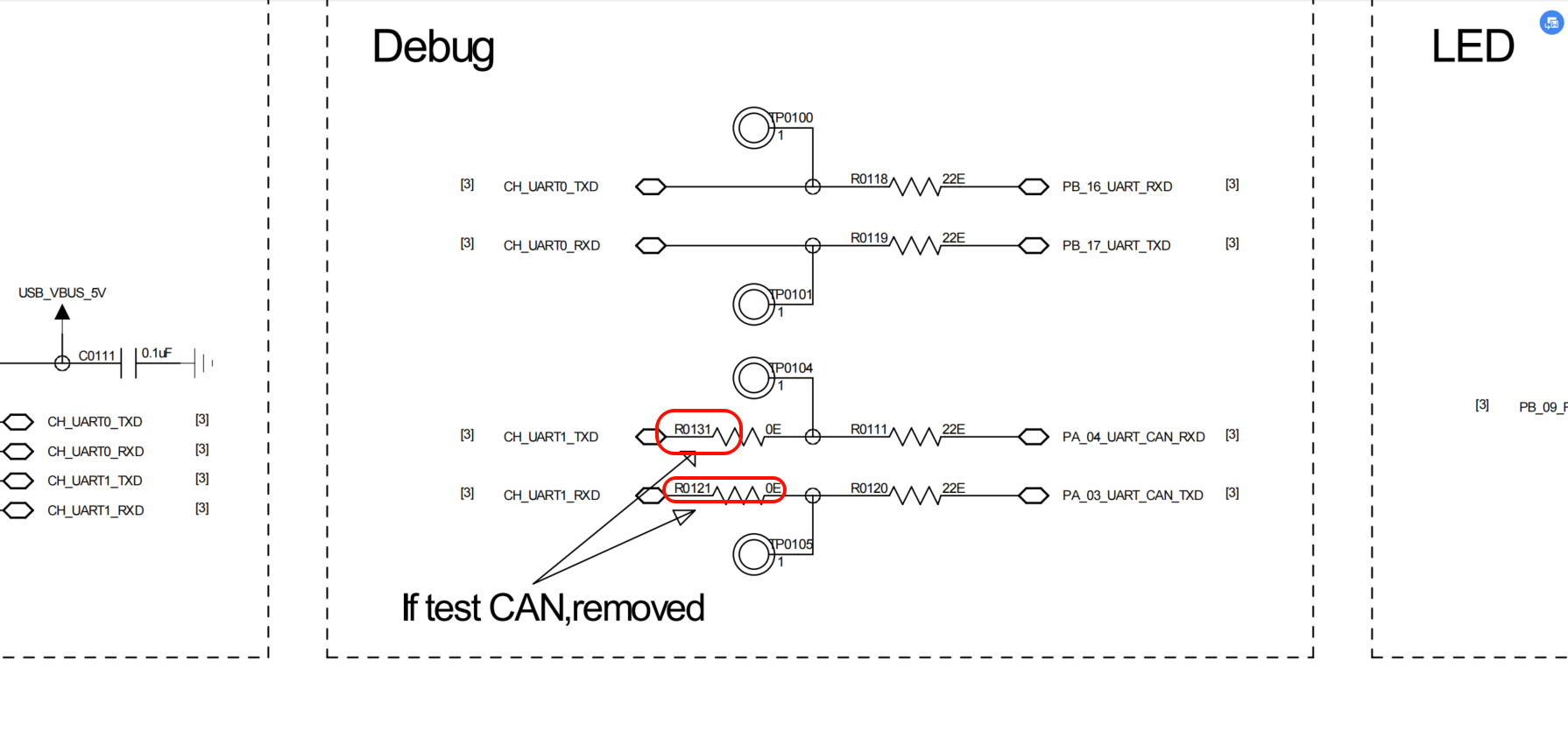
sf32lb56-lcd to CAN transceiver connection:
Board Pin |
CAN Transceiver |
|---|---|
PA03 (8) |
TX |
PA04 (9) |
RX |
5V |
VCC |
GND |
GND |
sf32lb58-lcd to CAN transceiver connection:
Board Pin |
CAN Transceiver |
|---|---|
PA00 |
TX |
PA03 |
RX |
5V |
VCC |
GND |
GND |
Between the two development boards’ CAN transceivers:
CAN Transceiver (can_tx side) |
CAN Transceiver (can_rx side) |
|---|---|
CANH |
CANH |
CANL |
CANL |
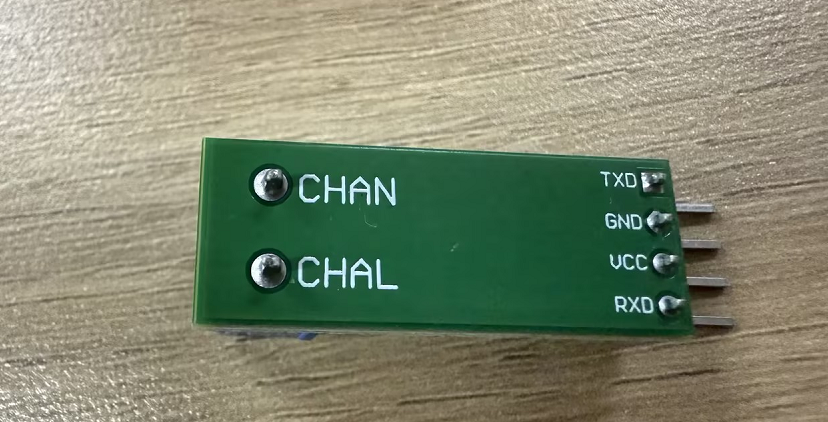
The TJA1050 module is silk-screened with
CHAN/CHAL, which are equivalent to the standard CANCANH/CANLCANH must connect to CANH and CANL to CANL; do not cross them. One 120Ω termination resistor is required at each end of the bus
CAN transceiver (TJA1050)
Usage
The sections below only cover the essential information. For the complete steps to configure SiFli-SDK and build/run the project, see the SiFli-SDK Quick Start Guide.
Compilation and Download
Compile and flash the can_tx and can_rx projects separately to the corresponding boards: the can_tx example is flashed to the sending board (Board A), and this project (can_rx) to the receiving board (Board B)
Switch to the example’s
projectdirectory (for exampleexample/hal/can/can_rx/project) and run the scons command to compile:
scons --board=sf32lb56-lcd_a128r12n1 -j8
After compilation, run
build_sf32lb56-lcd_a128r12n1_hcpu/download.bat; the program is downloaded automatically via JLinkOr use UART download:
build_sf32lb56-lcd_a128r12n1_hcpu/uart_download.bat
Project Configuration
The CAN bitrate and the polling/interrupt mode are both configured by macros in the source (can_rx/src/main.c):
Macro |
Default |
Description |
|---|---|---|
|
400000 |
Target CAN bitrate. |
|
1 |
Working mode: 0 = polling, 1 = interrupt |
To adjust the console UART or log switches, run menuconfig in the example directory (proj.conf already switches the console to UART4):
sdk.py menuconfig --board=<board_name>
Example Output
If the example runs successfully, you will see the following output on the serial port:
can_rx log output (interrupt mode
USE_CAN_IT=1, requires the can_tx board to send)
01-13 17:07:26:864     \ | /
01-13 17:07:26:865    - SiFli Corporation
01-13 17:07:26:868     / | \     build on Dec 25 2025, 2.4.0 build befba178
01-13 17:07:26:869     2020 - 2022 Copyright by SiFli team
01-13 17:07:26:873    mount /dev sucess
01-13 17:07:26:874    [I/drv.audprc] init 00 ADC_PATH_CFG0 0x924
01-13 17:07:26:877    [I/drv.audprc] HAL_AUDPRC_Init res 0
01-13 17:07:26:878    [I/drv] HAL_AUDCODEC_Init res 0
01-13 17:07:26:878    [I/TOUCH] Regist touch screen driver, probe=1001aa4d
01-13 17:07:26:882    call par CFG1(35bb)
01-13 17:07:26:883    fc 9, xtal 2000, pll 2038
01-13 17:07:26:887    call par CFG1(35bb)
01-13 17:07:26:889    fc 9, xtal 2000, pll 2038
01-13 17:07:26:890    CAN IT mode: RX-only board (semaphore + GetRxMessage).
01-13 17:07:27:068    [RECV Primary] ID=0x123, DLC=8, Data=0x11223344 0x55667788
01-13 17:07:27:570    [RECV Secondary] ID=0x103, DLC=8, Data=0xAAAA0003 0xBBBB0003
01-13 17:07:29:571    [RECV Primary] ID=0x123, DLC=8, Data=0x11223344 0x55667788
01-13 17:07:30:073    [RECV Secondary] ID=0x103, DLC=8, Data=0xAAAA0003 0xBBBB0003
01-13 17:07:32:074    [RECV Primary] ID=0x123, DLC=8, Data=0x11223344 0x55667788
01-13 17:07:32:576    [RECV Secondary] ID=0x103, DLC=8, Data=0xAAAA0003 0xBBBB0003
In polling mode (
USE_CAN_IT=0) the bus is polled every 100 ms and the log uses the[RECV ...]format (serial timestamps omitted here):
CAN polling mode: RX-only board.
Filters: Primary=0x123, Secondary=0x103

[RECV Primary] ID=0x123, DLC=8, Data=0x11223344 0x55667788
[RECV Secondary] ID=0x103, DLC=8, Data=0xAAAA0003 0xBBBB0003
...
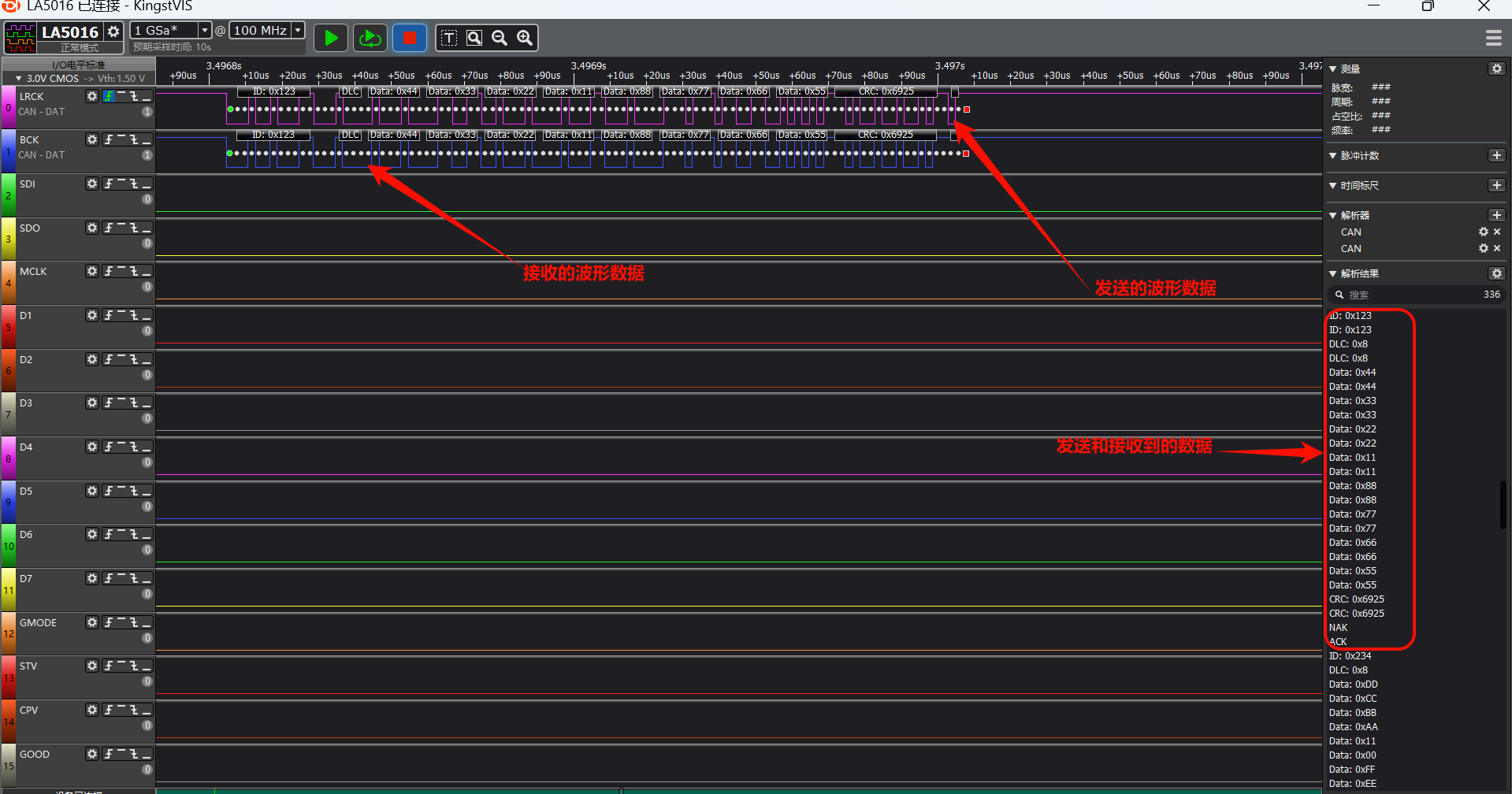
CAN Read/Write Waveform
This example only receives; the figure below shows the CAN bus waveform when the two development boards communicate.
CAN Configuration Parameters
static void CAN_Config(void)
{
  hcan.Instance = CAN1;

  /* Derive the prescaler and bit-timing segments from the target bitrate */
  if (HAL_CAN_CalcTiming(&hcan, CAN_BITRATE) < 0)
  {
    rt_kprintf("Failed to calculate CAN timing.\n");
    Error_Handler();
  }

  if (HAL_CAN_Init(&hcan) != HAL_OK)
  {
    rt_kprintf("CAN initialization failed.\n");
    Error_Handler();
  }

  CAN_FilterTypeDef can_filter_config;

  // Configure standard frame filter (ID=0x123, FilterBank=0)
  can_filter_config.FilterId = 0x123;
  can_filter_config.FilterMask = 0x7FF; // Exact match for standard ID
  can_filter_config.FilterBank = 0;
  can_filter_config.FilterActivation = ENABLE;
  can_filter_config.IDECheckEnable = ENABLE;
  can_filter_config.IDEValue = CAN_ID_STD; // Only accept standard frames
  if (HAL_CAN_ConfigFilter(&hcan, &can_filter_config) != HAL_OK)
  {
    rt_kprintf("Failed to configure CAN filter 0.\n");
    Error_Handler();
  }

  // Configure standard frame filter (ID=0x103, FilterBank=1)
  can_filter_config.FilterId = 0x103;
  can_filter_config.FilterMask = 0x7FF; // Exact match for standard ID
  can_filter_config.FilterBank = 1;
  can_filter_config.FilterActivation = ENABLE;
  can_filter_config.IDECheckEnable = ENABLE;
  can_filter_config.IDEValue = CAN_ID_STD; // Only accept standard frames
  if (HAL_CAN_ConfigFilter(&hcan, &can_filter_config) != HAL_OK)
  {
    rt_kprintf("Failed to configure CAN filter 1.\n");
    Error_Handler();
  }
}
First call
HAL_CAN_CalcTimingto derive the prescaler and bit-timing segments fromCAN_BITRATE(400 kbps by default) instead of hardcoding a prescaler value; the function assumes a 48 MHz CAN clockNext configure two filters. The filter’s
can_filter_config.FilterIdaccepts frames with ID 0x123 (FilterBank=0) and 0x103 (FilterBank=1), i.e. only standard frames with these two IDsFilter data frames through
can_filter_config.FilterMask(0x7FF is the standard frame mask, 0x1FFFFFFF is the extended frame mask)Configure the filter number through
can_filter_config.FilterBank(0~15)Control whether the filter is enabled through
can_filter_config.FilterActivationcan_filter_config.IDECheckEnableenables IDE checking, which distinguishes standard from extended framescan_filter_config.IDEValuecontrols whether to receive standard or extended frames
CAN Interrupt Mode
This example switches between polling and interrupt modes via the
USE_CAN_ITmacro (0=polling, 1=interrupt). In interrupt mode, the CAN controller notifies the CPU via hardware interrupts, eliminating the need for register polling and significantly reducing CPU load.Testing requires two development boards: can_tx (sender, Board A) and can_rx (receiver, Board B), both flashed with interrupt-mode firmware.
ISR Infrastructure
void CAN1_IRQHandler(void)
{
    rt_interrupt_enter();

    HAL_CAN_IRQHandler(&hcan);   // Unified entry point — identifies and dispatches interrupts

    rt_interrupt_leave();
}

void HAL_CAN_MspInit(CAN_HandleTypeDef *hcan)
{
    if (hcan->Instance == hwp_can1)
    {
        NVIC_EnableIRQ(CAN1_IRQn);
    }
}
HAL_CAN_Init automatically calls HAL_CAN_MspInit on first invocation, where the NVIC is enabled.
Receiver (can_rx / Board B)
A semaphore synchronizes the ISR with the main loop. The RIF callback releases the semaphore; the main loop waits and then drains all pending frames from RBUF:
static rt_sem_t can_rx_sem = RT_NULL;

void HAL_CAN_RxMsgPendingCallback(CAN_HandleTypeDef *hcan)
{
    rt_sem_release(can_rx_sem);     // ISR context — signal only
}

int main(void)
{
    /* After CAN init, filter config, and Start */
    can_rx_sem = rt_sem_create("can_rx", 0, RT_IPC_FLAG_FIFO);
    HAL_CAN_ActivateNotification(&hcan, CAN_IT_RX_MSG_PENDING);

    while (1)
    {
        if (rt_sem_take(can_rx_sem, RT_WAITING_FOREVER) == RT_EOK)
        {
            CAN_RxHeaderTypeDef rx_header;
            uint8_t rx_data[8];

            while (HAL_CAN_GetRxFifoFillLevel(&hcan) > 0)
            {
                if (HAL_CAN_GetRxMessage(&hcan, &rx_header, rx_data) == HAL_OK
                        && rx_header.DLC > 0)
                {
                    /* Print the received frame (omitted) */
                }
            }
        }
    }
}
The receiver has two filters configured (ID=0x123 and ID=0x103), so both the 0x123 frame sent by the peer can_tx board via the primary tx buffer and Frame 3 (ID=0x103) sent in a batch via the secondary tx buffer are accepted; the rest are filtered out by hardware. The Primary/Secondary labels in the log are distinguished by frame ID — the receiving hardware itself carries no information about which tx buffer the sender used.
Interrupt Types Summary
Parameter Macro |
Manual Flag |
Callback Function |
Trigger Condition |
|---|---|---|---|
|
RIF |
|
Each frame received |
|
RFIF |
|
RBUF (receive buffer) full |
|
ROIF |
|
RX overflow* |
|
RAFIF |
|
RBUF (receive buffer) nearly full |
|
TPIF |
|
Primary tx buffer (PTB) send complete |
|
TSIF |
|
Secondary tx buffer (STB) send complete (once per frame) |
* The current HAL implementation asserts (HAL_ASSERT(0)) in the overflow branch; do not rely on this callback for overflow handling at run time.
The table lists all interrupt types supported by CAN; this example (can_rx) only enables CAN_IT_RX_MSG_PENDING.
The “Manual Flag” column lists the IR register interrupt flag names from the chip manual. PTB/STB stand for Primary/Secondary Transmit Buffer, and RBUF for the receive buffer.
Multiple interrupts can be enabled via bitwise OR, e.g. CAN_IT_RX_MSG_PENDING | CAN_IT_RX_FIFO_FULL.
Complete TX/RX Flow
This example only demonstrates one-way communication: can_tx sends and can_rx receives.
Board A (can_tx)                          Board B (can_rx)
─────────────────                         ─────────────────
① Primary: ActivateNotification(TPIF)
   AddPrimaryTxMessage()
   → Frame(0x123) sent
   → TPIF → PrimaryCompleteCallback       ② RIF → RxMsgPendingCallback
                                             → sem_release
                                             → GetRxMessage → receive 0x123

③ Secondary: ActivateNotification(TSIF)
   AddSecondaryTxMessage() × 3
   → Frames(0x101, 0x102, 0x103) batch sent
   → TSIF → SecondaryCompleteCallback×3   ④ RIF → RxMsgPendingCallback
                                             → sem_release
                                             → read 0x103 (rest filtered)
Troubleshooting
If the output doesn’t match the logs or waveforms are inconsistent, please check the following:
Check if the hardware wiring is correct and consistent with the connection instructions above (CANH to CANH, CANL to CANL; do not swap TX/RX)
Check whether the two series resistors on the UART-multiplexed PA03/PA04 of
sf32lb56-lcdhave been removedCheck whether a 120Ω termination resistor is fitted at each end of the CAN bus
Check whether the sender and receiver use the same CAN bitrate (400 kbps by default)
Check whether the CAN transceiver modules are powered from 5V and share a common ground with the board
If the peer is unpowered or not connected to the bus, the sender receives no ACK and transmission fails — make sure both boards are powered
If you have any technical questions, please submit an issue on GitHub.